
About Arnis
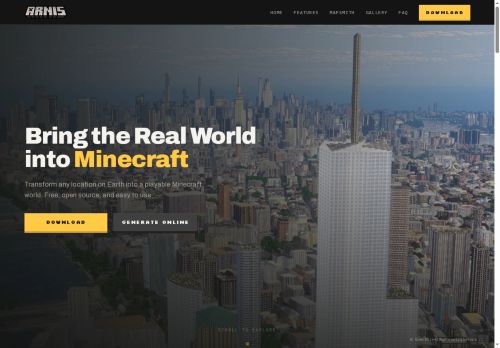
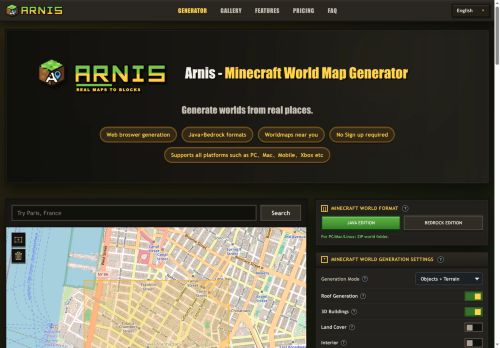
Exports Java edition as a zip world folder and Bedrock edition as a.mcworld file for desktop, mobile and console platforms.Browser-based workflow.search or draw a map area, choose settings (terrain, buildings, roofs, interiors, land cover), then generate and download.
Supports simple roofs, optional interiors and 3D building geometry when source data is available; spawn point and area selection options are included.Suitable for small areas such as neighborhoods, campuses and city blocks; runtime varies with area size and map detail.
Conversion follows source map coverage, so missing or sparse OpenStreetMap data produces correspondingly incomplete in-game features.
Key Features
- Converts real-world map data into playable Minecraft worlds
- Uses OpenStreetMap and elevation datasets to recreate roads, buildings, rivers, land use and terrain
- Exports Java edition as a zip world folder and Bedrock edition as a .mcworld file for desktop, mobile and console
- Browser-based workflow: search or draw a map area, choose generation settings (terrain, buildings, roofs, interiors, land cover), then generate and download
- Supports simple roofs, optional interiors, 3D building geometry when source data is available, plus spawn point and area selection options
Use Cases
- Recreate a real-world neighborhood in Minecraft without GIS or coding: select or draw an area from OpenStreetMap with elevation, configure terrain, buildings, roofs and interiors in the browser, then export Java or Bedrock worlds for educational tours or multiplayer roleplay
- Build accurate training and planning environments for urban designers or emergency responders by importing OSM and elevation data, fine-tuning building footprints, heights and interiors, and exporting small-scale playable worlds for scenario testing and stakeholder walkthroughs
- Generate location-based exhibits and classroom experiences: draw landmarks or neighborhoods, preserve terrain elevation and building details, customize interiors and roofs, and deliver easy-to-run Java/Bedrock worlds for guided lessons, history recreations, or museum installations
Who is it for?
- Minecraft builders and map creators
- Minecraft server administrators
- Game modders, content creators and streamers
- Urban planners, architects and designers
- Educators and students (geography, urban studies)
- Gis enthusiasts and openstreetmap contributors
- Campus planners and real-estate teams for visual mockups
- Roleplaying communities and collaborative builders
- Developers and technical users creating custom worlds and tools
- Hobbyists recreating real-world locations in minecraft
Based on 10 verified user reviews — Average rating: 4.00/5

@christopherparker941
TurkeyÇok hayal kırıklığı. Araç iki kez çöktü ve ücretsiz plan neredeyse kullanılamaz durumda.

@elizabethross2768
TurkeyTaslak üretimi için yeterince güvenilir. Çıktıyı düzenliyorum ama ilk geçiş güçlü.

@anthonycruz160
TurkeyGünlük kullanım sonrası detaylı yorum: Arnis hız konusunda güçlü, brief netse kalite de iyi. Aynı görevlerde iki alternatifle kıyasladım (blog outline, toplantı notu sadeleştirme, kısa SSS). Arnis en hızlısıydı ve tonu en az garip olandı. Zayıf yanı uç vakalar — niş jargon ve çok adımlı isteklerde sapabiliyor. Bunu kayıtlı bir stil/prompt rehberiyle çözdüm. Haftada birkaç kez kullanıyorsanız fiyatı makul; değilse ücretsiz katman yetebilir. Freelancer ve küçük ekiplere, güvenilir ilk taslak için öneririm.


@roynguyen9188
TurkeyDetailed take after daily use: Arnis is strongest on speed and decent on quality when the brief is clear. I tested it against two alternatives on the same tasks (blog outline, meeting notes cleanup, and a short product FAQ). Arnis was the fastest and produced the least awkward tone. Weak points are edge cases — niche jargon and multi-step instructions sometimes drift. I solved that with a saved prompt style guide. Pricing is okay if you actually use it several times a week; otherwise the free tier may be enough. Overall I would recommend it to freelancers and small teams who need reliable first drafts, not final publish-ready copy every time.

@judyphillips7764
TurkeyDetailed take after daily use: Arnis is strongest on speed and decent on quality when the brief is clear. I tested it against two alternatives on the same tasks (blog outline, meeting notes cleanup, and a short product FAQ). Arnis was the fastest and produced the least awkward tone. Weak points are edge cases — niche jargon and multi-step instructions sometimes drift. I solved that with a saved prompt style guide. Pricing is okay if you actually use it several times a week; otherwise the free tier may be enough. Overall I would recommend it to freelancers and small teams who need reliable first drafts, not final publish-ready copy every time.
More Gaming AI Tools
Explore other gaming tools with user ratings, pricing details, and in-depth descriptions. Updated regularly by our editorial team.