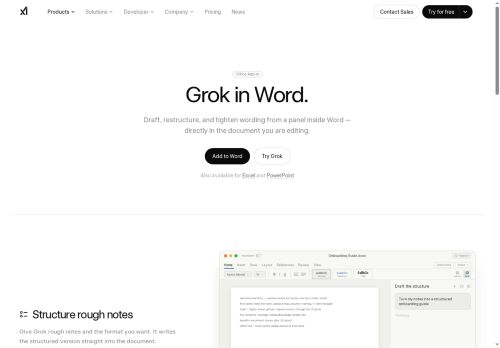

About Grok Word
Grok Word is a Microsoft Word add-in that embeds an AI writing assistant in a docked panel for in-document editing.It restructures and tightens wording, converts rough notes into formatted headings and lists, and normalizes heading styles across files.
The tool applies edits directly to the document with visible revisions, undo support and autosave to preserve version history.Grok Word supports consistent formatting across Word, Excel and PowerPoint files and exports structured content for onboarding guides, policy handbooks, launch plans and other business documents.
Admins can deploy the add-in org-wide from the Microsoft marketplace and integrate with SSO and existing collaboration tools.Developer APIs and console documentation enable automation and workflow integration for enterprise content workflows.
Key Features
Use Cases
Who is it for?
The tool applies edits directly to the document with visible revisions, undo support and autosave to preserve version history.Grok Word supports consistent formatting across Word, Excel and PowerPoint files and exports structured content for onboarding guides, policy handbooks, launch plans and other business documents.
Admins can deploy the add-in org-wide from the Microsoft marketplace and integrate with SSO and existing collaboration tools.Developer APIs and console documentation enable automation and workflow integration for enterprise content workflows.
Key Features
- Docked AI writing assistant panel embedded in Microsoft Word for in-document editing
- Automatic text restructuring and tightening (rewrites and edits)
- Converts rough notes into formatted headings and lists and normalizes heading styles across files
- Applies edits directly with visible revisions, undo support, and autosave to preserve version history
- Org-wide deployment from Microsoft Marketplace with SSO and collaboration-tool integration plus developer APIs and console documentation for automation and workflow integration
Use Cases
- Convert messy meeting notes and brainstorms into a polished, structured Word report using Grok Word's notes-to-headings and automated content structuring, auto-applying formatted headings and lists while preserving revision history with autosave for seamless team review
- Standardize company documents across Word, Excel and PowerPoint by using Grok Word's document style normalization and workflow automation API to enforce fonts, spacing and header hierarchy enterprise-wide with SSO-secured access
- Tighten and restructure long proposals or reports directly in the docked AI editor with Grok Word's in-document revision-aware editing, instant rewrite suggestions and autosave so authors can iterate faster and maintain clear version control
Who is it for?
- Technical writers
- Product managers
- Executive assistants
- Training facilitators
- Hr onboarding teams
Based on 9 verified user reviews — Average rating: 3.67/5

@justinkelly8636
TurkeyBeyin fırtınası ve ilk taslaklar için harika. Bu ay birkaç saatimi kurtardı.

@samanthawilliams6272
TurkeyDecent enough for light use. Not amazing, but it gets simple jobs done.

@erarant4098
TurkeyGünlük işler için fiyat/performans iyi. Hafif düzenleme yetiyor.


@anderwen4288
United KingdomFour stars. Reliable enough that it earned a spot in my toolkit.
@jonathanwhite8286
TurkeyHızından etkilendim. Gerçek bir projede denedim ve gayet iyi dayandı.
More Writing AI Tools
Explore other writing tools with user ratings, pricing details, and in-depth descriptions. Updated regularly by our editorial team.