
About CueCue
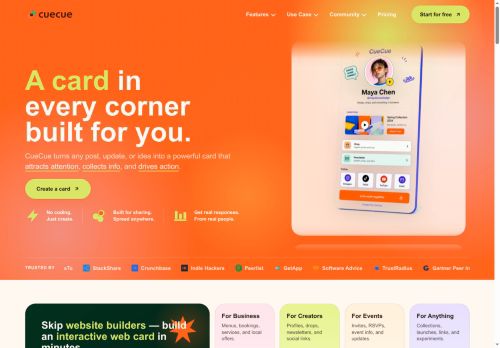
Include product cards with images, purchase links, waitlists and launch dates, event pages with RSVP forms and Google Sheets integration, plus digital business card templates and landing pages.Supports QR codes, URL shortener, social links, embedded videos and customizable templates to match creator, brand or small-business workflows.
Keep one stable profile link and update the featured card as content changes to direct TikTok traffic without editing the profile URL.Use cases include creators, educators, beauty professionals and small-event organizers seeking clearer navigation, centralized management of drops and bookings, and improved mobile user flow.
Key Features
- Mobile-first link-in-bio profile that aggregates videos, products, bookings and community links into a single URL
- Visual card layouts supporting full video playback and action-specific cards (product drop, waitlist, booking, RSVP, download)
- Product cards with images, purchase links, waitlists and launch date scheduling
- Event pages with RSVP forms and Google Sheets integration
- Support for QR codes, URL shortener, embedded videos, social links and customizable templates
Use Cases
- Create a mobile-first link-in-bio using cuecue to centralize videos, products and community links into visual action cards, launch product drops with timed releases, open waitlists or enable instant downloads, and update everything from a single URL without any coding or extra tools
- Build event and booking landing pages with cuecue to manage RSVPs, ticket drops and appointments through tappable video and action cards, embed promo playback, collect guest info, sync bookings to your calendar, and keep attendees informed from one shareable profile
- Turn your profile into a digital business card and conversion hub with cuecue, showcase portfolio videos, list products and downloadable assets, add booking and purchase cards, integrate payment or CRM links, and convert followers into customers while maintaining one updatable URL
Who is it for?
- Short-form video creators
- Content creators
- E-commerce sellers
- Event organizers
- Social media influencers
Based on 9 verified user reviews — Average rating: 4.11/5

@juliealvarez4262
TurkeyI have been using CueCue for a few weeks on real client work, not just demos. The first week was mostly learning prompts and figuring out which templates stick. After that, drafting time dropped noticeably — especially for outlines, email replies, and first-pass summaries. It is not flawless: long documents sometimes lose structure, and I still fact-check anything important. Still, for a busy week it has become one of the tools I open without thinking. If you already have a clear workflow, CueCue fits in cleanly. If you expect magic with zero editing, you will be disappointed. For me, the time saved on the boring middle steps is worth it.

@marynguyen2712
TurkeyDetailed take after daily use: CueCue is strongest on speed and decent on quality when the brief is clear. I tested it against two alternatives on the same tasks (blog outline, meeting notes cleanup, and a short product FAQ). CueCue was the fastest and produced the least awkward tone. Weak points are edge cases — niche jargon and multi-step instructions sometimes drift. I solved that with a saved prompt style guide. Pricing is okay if you actually use it several times a week; otherwise the free tier may be enough. Overall I would recommend it to freelancers and small teams who need reliable first drafts, not final publish-ready copy every time.

@alexiscruz1847
TurkeyArayüzü temiz, çıktı kalitesi iyi. Günlük işlerimde sık kullanıyorum.


@carolynjones4962
TurkeyMenü kalabalığı yok, özellikler işe yarıyor. Pratik bir AI katkısı.

@stephaniewood5339
TurkeyBeyin fırtınası ve ilk taslaklar için harika. Bu ay birkaç saatimi kurtardı.
More Landing Page Generator AI Tools
Explore other landing page generator tools with user ratings, pricing details, and in-depth descriptions. Updated regularly by our editorial team.