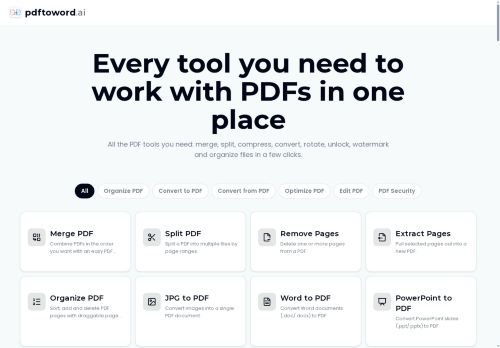

About PDFtoword AI
OCR adds a searchable text layer to scanned pages; PDF-to-Excel extracts tables into spreadsheets.Editing and organization tools include merge, split (by page range), extract, delete, reorder, rotate, crop, add page numbers, and apply watermarks.
Optimization tools cover file compression and repair for corrupted PDFs; image-to-PDF and PDF-to-image conversion are supported.Security features include AES-256 password protection and password removal for unlocked files.
Workflow is browser-based with drag-and-drop upload and immediate processing, suitable for students, researchers, business users, legal teams, and HR for document conversion, consolidation, and protection.
Key Features
- Converts between PDF and Word, Excel, PowerPoint, JPG, and HTML; supports PDF/A archival conversion
- OCR adds a searchable text layer to scanned pages
- Editing and organization tools: merge, split by page range, extract, delete, reorder, rotate, crop, add page numbers, apply watermarks
- Optimization and conversion tools: file compression, repair for corrupted PDFs, image-to-PDF and PDF-to-image conversion
- Security features: AES-256 password protection and password removal for unlocked files
Use Cases
- Convert scanned contracts, receipts, and legal documents into editable, searchable Word files with pdftoword.ai's OCR and PDF-to-Word tools—edit without retyping, extract key data, then secure the final document with AES-256 encryption for safe sharing
- Extract complex tables from bank statements, invoices, and reports into Excel using pdftoword.ai's PDF-to-Excel and table-extraction features, then merge, compress, and optimize multiple PDFs into a single, analysis-ready workbook for accounting or audit workflows
- Prepare client-ready materials by converting PDFs to PowerPoint or images to PDF, repair or split large documents in-browser, and apply password protection or compression with pdftoword.ai for secure, easy distribution without installing software
Who is it for?
- Document engineers
- Business managers
- Legal teams
- Hr teams
- Students
Based on 6 verified user reviews — Average rating: 3.50/5

@garykelly7713
TurkeyDetailed take after daily use: PDFtoword AI is strongest on speed and decent on quality when the brief is clear. I tested it against two alternatives on the same tasks (blog outline, meeting notes cleanup, and a short product FAQ). PDFtoword AI was the fastest and produced the least awkward tone. Weak points are edge cases — niche jargon and multi-step instructions sometimes drift. I solved that with a saved prompt style guide. Pricing is okay if you actually use it several times a week; otherwise the free tier may be enough. Overall I would recommend it to freelancers and small teams who need reliable first drafts, not final publish-ready copy every time.

@doristurner2159
TurkeyBeklentimin altında. Ara sıra işe yarayan kısımlar var ama gerçek iş için fazla hatalı.

@christinamitchell860
TurkeyGüzel bir keşif. Dokümantasyon biraz daha net olabilirdi ama öğrenince verimli.


@jeremycollins9104
TurkeyHenüz olgun değil. Hızla ücrete takıldım, ücretsiz sonuçlar da çok zayıftı.

@daniellerobinson6330
Turkeyİlk izlenimim karışıktı, sonra oturdu. Artık haftalık araç setimin parçası.
More Document management AI Tools
Explore other document management tools with user ratings, pricing details, and in-depth descriptions. Updated regularly by our editorial team.