
About Image Color Picker
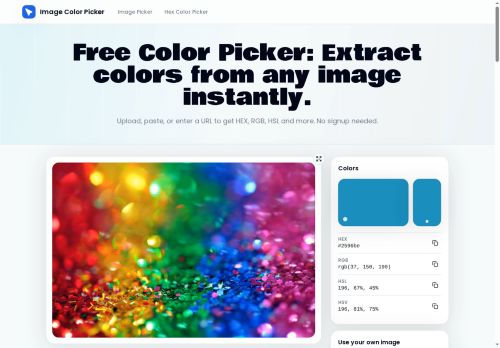
Image Color Picker extracts hex, RGB, HSL, and HSV values from images and screenshots.Upload files, paste from the clipboard, or enter an image URL to sample pixel values with an eyedropper tool.Pixel-level sampling via the browser canvas reads the pixel beneath the cursor and updates color values on hover.
Copy single color codes with one click, build and export color palettes, download palette text files, or save palettes locally.Supports PNG, JPG, WebP, SVG, and GIF and can sample from website thumbnails, screenshots, and photos for brand audits and design checks.
Browser-based processing keeps local files on the device; remote URL sampling depends on the source server’s canvas access permissions.
Key Features
Use Cases
Who is it for?
Copy single color codes with one click, build and export color palettes, download palette text files, or save palettes locally.Supports PNG, JPG, WebP, SVG, and GIF and can sample from website thumbnails, screenshots, and photos for brand audits and design checks.
Browser-based processing keeps local files on the device; remote URL sampling depends on the source server’s canvas access permissions.
Key Features
- Extracts color values (hex, RGB, HSL, HSV) from images and screenshots
- Accepts input via file upload, clipboard paste, or image URL
- Pixel-level eyedropper sampling using the browser canvas with hover-updated color readout
- Palette management: one-click copy of color codes, build/export palettes, download palette text files, and save palettes locally
- Supports PNG, JPG, WebP, SVG, GIF; processes local files in-browser (keeps files on device); remote URL sampling depends on source server canvas access permissions
Use Cases
- Extract exact hex, RGB, HSL and HSV codes from any image, screenshot or URL with Image Color Picker's on-canvas eyedropper—copy color codes instantly and maintain consistent UI/branding palettes without any design plugins or coding.
- Create and export organized color palettes from photos, screenshots or web images by uploading, pasting or supplying a URL; Image Color Picker lets you sample pixels, arrange swatches, export palettes and save them locally for seamless handoff to designers and developers.
- Match product or competitor colors precisely by sampling pixels from screenshots or live web images using Image Color Picker, then copy codes or download palette files to implement pixel-perfect styling across websites, presentations and marketing assets.
Who is it for?
- Graphic designers
- Product designers
- Front-end developers
- Brand managers
- Students
Based on 6 verified user reviews — Average rating: 4.00/5

@alicemoore4949
TurkeyImage Color Picker beklediğimden daha iyi. Temiz arayüz ve güvenilir çıktılar.
More Image Analysis AI Tools
Explore other image analysis tools with user ratings, pricing details, and in-depth descriptions. Updated regularly by our editorial team.