
About MuzeImage
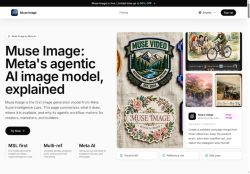
Local editing tools allow precise region edits (circle-and-scribble) so users can change specific areas without rebuilding the whole image.The model supports improved in-image text fidelity and layout control for headlines, social cards, and story-format assets tailored for Instagram Stories, WhatsApp, and ads.
Workflow features include generation history, adjustable quality modes, and a public API for integration into developer and creative pipelines.Typical users include creators prototyping visual concepts, marketers producing campaign variants, brands validating product fidelity and permissions, and teams generating repeatable social-ready assets.
Key Features
- Prompt-first multi-reference composition accepting detailed text prompts and multiple reference images
- Generation of outputs in common aspect ratios (1:1, 4:3, 3:4, 16:9, 9:16)
- Local precise region editing (circle-and-scribble) for targeted edits without rebuilding the whole image
- Improved in-image text fidelity and layout control for headlines, social cards, and story-format assets
- Workflow features including generation history, adjustable quality modes, and a public API for integration
Use Cases
- Create high-converting e-commerce product images by combining detailed prompts with multiple reference photos to preserve product details and brand style, use precise local edits and in-image text/layout control for labels and specs, and export in common aspect ratios ready for listings
- Produce platform-optimized social media campaigns using Muse's social templates and prompt-first multi-reference composition to maintain consistent looks across channels, perform region-specific edits and in-image text localization for different markets, and quickly generate A/B creative variations
- Automate marketing and ad creative workflows with Muse's image generation API to batch-create on-brand visuals from prompts and reference images, track edit history for iterative adjustments, and generate product-focused or people-preserving images for landing pages and ads
Who is it for?
- Visual designers
- Campaign creators
- Brand designers
- Social media managers
- Content editors
Based on 7 verified user reviews — Average rating: 4.57/5
@ruthhernandez796
TurkeyDetailed take after daily use: MuzeImage is strongest on speed and decent on quality when the brief is clear. I tested it against two alternatives on the same tasks (blog outline, meeting notes cleanup, and a short product FAQ). MuzeImage was the fastest and produced the least awkward tone. Weak points are edge cases — niche jargon and multi-step instructions sometimes drift. I solved that with a saved prompt style guide. Pricing is okay if you actually use it several times a week; otherwise the free tier may be enough. Overall I would recommend it to freelancers and small teams who need reliable first drafts, not final publish-ready copy every time.

@eugenegomez5478
TurkeyExactly what I needed for quick iterations. Recommend for freelancers and small teams.
More Image generation AI Tools
Explore other image generation tools with user ratings, pricing details, and in-depth descriptions. Updated regularly by our editorial team.