
About KidVoice
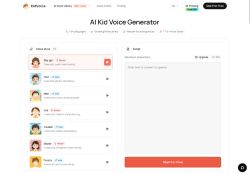
Browser-based workflow lets creators upload a reference clip for voice cloning, paste scripts, generate speech, preview in-browser and download finished audio files.Target users include content creators, educators, game developers and animators producing childlike narration, character dialogue, lessons and short-form video audio.
Automatic language handling and delivery controls provide clear pronunciation and consistent pacing suitable for lessons, audiobooks, games and social clips.A single workspace stores scripts, permitted reference audio and generated files to streamline iterative editing and version control.
Use cases include YouTube Shorts and TikTok narration, bedtime stories, language practice, animation prototypes, game character drafts and audio demos.
Key Features
- Wide selection of child voice styles
- Permitted voice cloning from uploaded reference clips
- Multilingual text-to-speech (English, Chinese, Japanese, Korean, German, French, Russian, Portuguese, Spanish, Italian)
- Browser-based workflow: paste scripts, generate speech, preview in-browser, and download audio files
- Single workspace storing scripts, permitted reference audio, and generated files with iterative editing and version control
Use Cases
- Create engaging multilingual bedtime-story narrations using KidVoice's 50+ kid styles and permitted voice cloning, preview and download in-browser, and store scripts and generated audio in the workspace to produce localized versions in 10+ languages for global distribution
- Produce authentic animation and game character voices with KidVoice's diverse child TTS options and voice cloning, iterate quickly with in-browser previews and downloads, and organize scripts, references and exported clips in the workspace for seamless integration into projects
- Generate short-form video narrations and social-media voiceovers using KidVoice's multilingual child voices, mix and match kid styles to find the perfect tone, preview/download variations instantly and keep all scripts and audio assets organized in the workspace for fast content production
Who is it for?
- Content creators
- Game developers
- Children's authors
- Animators
- Language teachers
Based on 10 verified user reviews — Average rating: 4.30/5

@brittanyallen6163
TurkeyKidVoice ile ilgili sürpriz, tercihleri ayarladıktan sonra sürtünmenin azalması oldu. Kısa bir kontrol listem var: hedef kitle, ton, zorunlu maddeler, istenmeyen ifadeler. Bunlarla çıktılar düzenli şekilde kullanılabilir oluyor. Olmadan sonuçlar genel kalıyor. Boş sayfadan başlamak yerine hızlıca iterasyon yapabilmek de büyük artı. Eksik gördüğüm yerler: daha iyi sürüm geçmişi ve net export seçenekleri. Yine de dağınık birkaç aracı elimden aldı. Puanım reklam değil, haftalık pratik faydaya göre.

@alicemoore4949
Turkeyİlk izlenimim karışıktı, sonra oturdu. Artık haftalık araç setimin parçası.

@andreacox9420
TurkeyHızından etkilendim. Gerçek bir projede denedim ve gayet iyi dayandı.


@onahvers7506
IndiaPretty solid overall. A few quirks, but I keep using it weekly.

@stephaniehernandez16
TurkeyWhat surprised me about KidVoice is how little friction there is once you set preferences. I keep a short checklist: audience, tone, must-include points, and forbidden phrases. With that, outputs are consistently usable. Without it, results feel generic. I also like that I can iterate quickly instead of restarting from a blank page. Missing features for me: better version history and clearer export options. Even so, it has replaced a couple of scattered tools in my stack. Rating reflects practical value in my week, not hype from the landing page.
More Text-to-speech AI Tools
Explore other text-to-speech tools with user ratings, pricing details, and in-depth descriptions. Updated regularly by our editorial team.