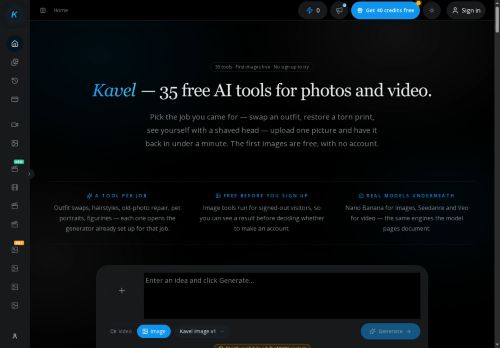

About Kavel AI
The studio workflow guides tool selection, prompt and reference upload, resolution and length settings, and previewing and downloading generated assets.Features support combining up to 14 reference images, pinning start/end frames for video, and native audio for motion outputs.
Outputs target portrait, product, social short-form and cinematic visuals with presets for consistent styles and production-ready shots.An examples gallery and model-specific presets help users assess expected results and choose appropriate image or video models.
Key Features
- Text-to-image generation using image models (nano banana 2)
- Short cinematic video generation using video models (seedance 2, veo 3.1) with motion effects, native audio, and pinning start/end frames
- Multi-reference input: upload and combine up to 14 reference images for generation and edits
- Image editing and style-transfer toolkit: outfit/clothes swap, hairstyle/gender changes, aging/bald filters, braces, restoration, pixel/Minecraft conversion, caricature/figurine and stylized outputs
- Studio workflow and controls: guided tool selection, prompt and reference upload, resolution and length settings, model-specific presets, previewing and downloading assets
Use Cases
- Generate consistent, production-ready e-commerce visuals using Kavel to create multi-angle product photos and short promotional videos from multi-reference inputs, apply outfit/colour swaps and pixel conversions, and export optimized assets for listings and ads
- Prototype fashion collections and social lookbooks by using Kavel’s outfit swap editor, hair and gender morphing and style transfer to iterate on ensembles and hairstyles, then produce short cinematic videos and ready-to-post imagery for campaigns
- Restore and repurpose legacy photos and character assets with Kavel’s photo restoration AI and caricature generator to create high-resolution, colorized images and short animated clips for educational materials, online courses, or multimedia storytelling
Who is it for?
- Content creators
- E-commerce sellers
- Product designers
- Educators
- Videographers
Based on 5 verified user reviews — Average rating: 4.20/5

@janetrobinson987
TurkeyI have been using Kavel AI for a few weeks on real client work, not just demos. The first week was mostly learning prompts and figuring out which templates stick. After that, drafting time dropped noticeably — especially for outlines, email replies, and first-pass summaries. It is not flawless: long documents sometimes lose structure, and I still fact-check anything important. Still, for a busy week it has become one of the tools I open without thinking. If you already have a clear workflow, Kavel AI fits in cleanly. If you expect magic with zero editing, you will be disappointed. For me, the time saved on the boring middle steps is worth it.

@natalieross6017
TurkeyNot ready yet. I hit paywalls quickly and the free results were too weak.

@kellythomas7003
TurkeyKavel AI beklediğimden daha iyi. Temiz arayüz ve güvenilir çıktılar.

@brittanyscott3628
TurkeyKavel AI ile taslak ve özet çıkarıyorum. Karmaşık hissettirmeden sürtünmeyi azaltıyor.

@bettybennett3832
TurkeyDetailed take after daily use: Kavel AI is strongest on speed and decent on quality when the brief is clear. I tested it against two alternatives on the same tasks (blog outline, meeting notes cleanup, and a short product FAQ). Kavel AI was the fastest and produced the least awkward tone. Weak points are edge cases — niche jargon and multi-step instructions sometimes drift. I solved that with a saved prompt style guide. Pricing is okay if you actually use it several times a week; otherwise the free tier may be enough. Overall I would recommend it to freelancers and small teams who need reliable first drafts, not final publish-ready copy every time.
More Image generation AI Tools
Explore other image generation tools with user ratings, pricing details, and in-depth descriptions. Updated regularly by our editorial team.