
About AIVideoSummarizer.io
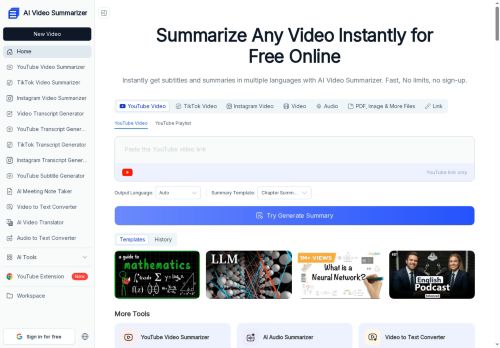
The tool generates structured outputs including timestamps, key points, summary tables, and multiple customizable templates optimized for lectures, interviews, finance videos, and courses.Outputs can be exported as editable transcripts or visual mind maps to help students, educators, researchers, content creators, and journalists organize and reuse material.
Language and speaker recognition features support multi-language transcripts and multi-speaker videos for meeting and interview workflows.The service converts long-form content into research notes, study outlines, content briefs, and editing-ready summaries for faster content consumption and workflow integration.
Key Features
- Generates summaries, full transcripts, subtitles, and chapter markers
- Accepts uploads and direct links (YouTube, Zoom); supports MP4, MOV, AVI, MKV, WEBM up to 1 GB
- Produces structured outputs with timestamps, key points, summary tables, and customizable templates for lectures, interviews, finance videos, and courses
- Exports editable transcripts and visual mind maps
- Performs multi-language transcription and speaker recognition for multi-speaker videos
Use Cases
- Convert long lecture recordings into concise study materials using AI Video Summarizer—automatically generate full transcripts, chapter markers, timestamps, multi-speaker recognition, mind maps and editable study notes for quick revision and sharing
- Turn recorded meetings and interviews into searchable, shareable documentation with AI Video Summarizer by producing speaker-labeled transcripts, subtitles, key-point tables and customizable templates to distribute concise summaries and action items to stakeholders
- Repurpose video content for social and educational platforms using AI Video Summarizer to auto-create multi-language subtitles, SEO-friendly summaries, chapter timestamps and exportable editing notes to speed up clipping, translation and publishing
Who is it for?
- Content creators
- Video editors
- Course creators
- Podcasters
- Students
Based on 13 verified user reviews — Average rating: 4.15/5

@aughnvers6728
TurkeyGenel olarak sağlam. Küçük tuhaflıkları var ama haftalık kullanıyorum.

@julieyoung8841
TurkeyWhat surprised me about AIVideoSummarizer.io is how little friction there is once you set preferences. I keep a short checklist: audience, tone, must-include points, and forbidden phrases. With that, outputs are consistently usable. Without it, results feel generic. I also like that I can iterate quickly instead of restarting from a blank page. Missing features for me: better version history and clearer export options. Even so, it has replaced a couple of scattered tools in my stack. Rating reflects practical value in my week, not hype from the landing page.

@garynelson3134
TurkeyWorks smoothly on desktop. Would love more export options, but the core experience is good.


@ruthhernandez796
TurkeyDetailed take after daily use: AIVideoSummarizer.io is strongest on speed and decent on quality when the brief is clear. I tested it against two alternatives on the same tasks (blog outline, meeting notes cleanup, and a short product FAQ). AIVideoSummarizer.io was the fastest and produced the least awkward tone. Weak points are edge cases — niche jargon and multi-step instructions sometimes drift. I solved that with a saved prompt style guide. Pricing is okay if you actually use it several times a week; otherwise the free tier may be enough. Overall I would recommend it to freelancers and small teams who need reliable first drafts, not final publish-ready copy every time.

@sophiagonzalez6564
TurkeyUseful features without overwhelming menus. A practical AI addition to my toolkit.
More Summarizer AI Tools
Explore other summarizer tools with user ratings, pricing details, and in-depth descriptions. Updated regularly by our editorial team.