
About FigEditor AI
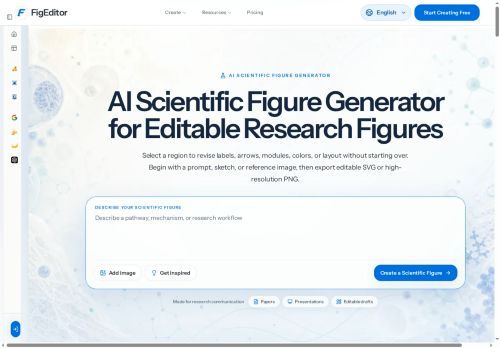
Built-in tools include label and arrow editing, module and layout control, a flowchart generator, and a scientific poster maker.Multiple image models (Nano Banana, Nano Banana 2, Nano Banana Pro, GPT Image 2) support different visual styles and resolution needs.
The workflow centers on three stages—define the scientific story, generate a structured draft with clear hierarchy, then review, refine, and export for papers, posters, or presentations.Intended users include researchers, academics, and teams across life sciences, engineering, materials science, and environmental research who need reproducible, editable figures and graphical abstracts.
Key Features
- Create editable research figures from text prompts, sketches, or reference images
- Export editable SVG and high-resolution PNG
- Vectorize raster figures (PNG, JPG) for editable labels, colors, and layout
- Built-in tools: label and arrow editing, module and layout control, flowchart generator, scientific poster maker
- Multiple image models (Nano Banana, Nano Banana 2, Nano Banana Pro, GPT Image 2) supporting different visual styles and resolutions
Use Cases
- Create publication-ready figures for research manuscripts using FigEditor, generating editable vector graphics and high-resolution PNGs from text prompts, sketches, or reference images, then fine-tune labels, arrows and layout to meet journal DPI and formatting requirements
- Convert legacy raster images or hand-drawn sketches into fully editable vector diagrams with FigEditor’s vectorization, adjust modules and relabel arrows, and regenerate flowcharts or schematic panels for reuse across slides, supplements, and lab protocols
- Assemble graphical abstracts and conference posters quickly with FigEditor’s text-to-figure and poster export features, combining automated flowchart generation, module control and layout tools to produce cohesive, print-ready posters and high-resolution figure panels
Who is it for?
- Scientific illustrators
- Academic authors
- Data visualizers
- Research managers
- Graduate students
Based on 8 verified user reviews — Average rating: 3.50/5

@sophiarobinson7553
TurkeyExactly what I needed for quick iterations. Recommend for freelancers and small teams.

@elijahwatson7306
TurkeyBenim kullanım alanıma yeterince isabetli. Destek dönüşleri de makul sürede geldi.

@jeffreymorgan9865
TurkeyI have been using FigEditor AI for a few weeks on real client work, not just demos. The first week was mostly learning prompts and figuring out which templates stick. After that, drafting time dropped noticeably — especially for outlines, email replies, and first-pass summaries. It is not flawless: long documents sometimes lose structure, and I still fact-check anything important. Still, for a busy week it has become one of the tools I open without thinking. If you already have a clear workflow, FigEditor AI fits in cleanly. If you expect magic with zero editing, you will be disappointed. For me, the time saved on the boring middle steps is worth it.


@theresaroberts6656
TurkeyPoor experience. Outputs were generic, inaccurate, and wasted more time than they saved.

@alicelopez9539
TurkeyFigEditor AI is promising. A couple of features are missing, but the core is strong.
More Diagram Generation AI Tools
Explore other diagram generation tools with user ratings, pricing details, and in-depth descriptions. Updated regularly by our editorial team.