
About AI Chat for Search
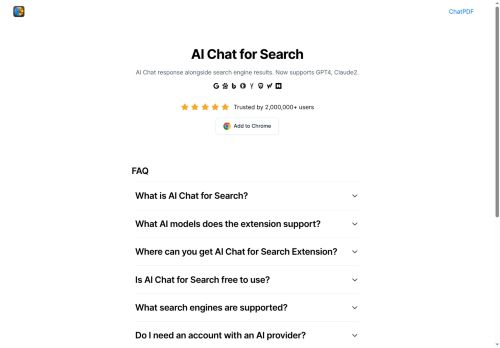
Compatible with Google, Bing, DuckDuckGo, Baidu, Brave, Yahoo, Naver, Yandex, Kagi and Searx for integrated search workflows.Includes YouTube summarization, ChatPDF integration, PDF and image tools, OCR, resume and invoice scanning, and AI content-generation utilities.
Consolidates search results, multi-model answers, and file-processing tools in the browser to accelerate research, content creation, and information discovery.Available on the Chrome Web Store for researchers, students, content creators and knowledge workers seeking comparative AI responses during search.
Key Features
- Displays AI conversational responses alongside search engine results
- Supports multiple AI models/providers (e.g., GPT-4, Claude 2) for comparative responses
- Integrates with many search engines (Google, Bing, Baidu, DuckDuckGo, Brave, Yahoo, Naver, Yandex, Kagi, Searx)
- Provides summarization tools including webpage, YouTube video, and PDF (ChatPDF) summaries
- Includes a suite of AI utilities: image generator and editor (remove background/text/object, upscale, change background), AI detector, video generator, mind map maker, math solver, PDF conversion/OCR, resume and invoice scanners
Use Cases
- Perform fast, source-backed research directly in your browser by combining conversational AI answers and side-by-side multi-model comparisons alongside search results, automatically summarizing linked PDFs, YouTube videos and scanned images/OCR to synthesize findings and generate citations for reports or academic papers
- Automate document processing and data extraction by scanning resumes, invoices and PDFs with OCR to produce structured summaries and exportable candidate shortlists or accounting line items, then generate tailored emails, interview questions or invoice entries using GPT-4/Claude content-generation tools
- Create SEO-optimized content and video-based summaries by extracting transcripts from YouTube and facts from PDFs, comparing outputs across models to pick the best tone and draft, and producing ready-to-publish blog posts, meta descriptions and social snippets enriched with source references
Who is it for?
- Software developers
- Creative writers
- Digital content creators
- Product managers
- Business analysts
Based on 10 verified user reviews — Average rating: 4.10/5

@eugenehughes3270
TurkeyI have been using AI Chat for Search for a few weeks on real client work, not just demos. The first week was mostly learning prompts and figuring out which templates stick. After that, drafting time dropped noticeably — especially for outlines, email replies, and first-pass summaries. It is not flawless: long documents sometimes lose structure, and I still fact-check anything important. Still, for a busy week it has become one of the tools I open without thinking. If you already have a clear workflow, AI Chat for Search fits in cleanly. If you expect magic with zero editing, you will be disappointed. For me, the time saved on the boring middle steps is worth it.

@marthaprice1631
TurkeyI have been using AI Chat for Search for a few weeks on real client work, not just demos. The first week was mostly learning prompts and figuring out which templates stick. After that, drafting time dropped noticeably — especially for outlines, email replies, and first-pass summaries. It is not flawless: long documents sometimes lose structure, and I still fact-check anything important. Still, for a busy week it has become one of the tools I open without thinking. If you already have a clear workflow, AI Chat for Search fits in cleanly. If you expect magic with zero editing, you will be disappointed. For me, the time saved on the boring middle steps is worth it.

@gregoryturner8728
TurkeyExactly what I needed for quick iterations. Recommend for freelancers and small teams.


@eugenegomez5478
TurkeyI compared a few alternatives and this one felt more practical for everyday use.

@mariecastillo4901
TurkeyAI Chat for Search araçını birkaç haftadır gerçek işlerde deniyorum; sadece demo değil. İlk hafta prompt alışkanlığı kazanmakla geçti. Sonrasında özellikle taslak, e-posta yanıtı ve özet işlerinde süre belirgin düştü. Kusursuz değil: uzun metinlerde yapı bozulabiliyor ve kritik noktaları mutlaka kontrol ediyorum. Yine de yoğun bir haftada düşünmeden açtığım araçlardan biri oldu. Net bir iş akışınız varsa AI Chat for Search kolay oturuyor. Sıfır düzenlemeyle sihir bekliyorsanız hayal kırıklığı olur. Benim için sıkıcı ara adımları kısaltması yeterli sebep.
More Search engine AI Tools
Explore other search engine tools with user ratings, pricing details, and in-depth descriptions. Updated regularly by our editorial team.