
About Uplup
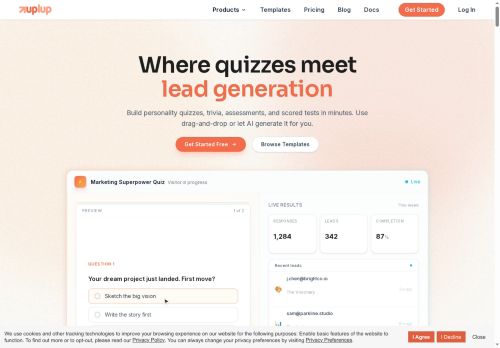
Create contact forms, lead capture, job applications, event registration, order forms, and assessments using 38+ field types, file uploads, payment collection, and e-signatures.
Set conditional logic, page routing, skip logic, branching, and quiz scoring (pass/fail, timers, leaderboards) for personalized respondent flows.
Edit fields, styling, and structure in-chat with instant previews and real-time updates.
Access completion rates, submission trends, quiz scores, and geographic analytics directly from the AI panel.
Key Features
- Conversational AI agent that builds and edits forms and quizzes from plain-English commands
- Drag-and-drop visual builder with live preview and instant application of changes
- Support for diverse field types and inputs (email, star ratings, textareas, dropdowns, file uploads, signatures, payments)
- Conditional logic, page routing, skip logic and smart branching
- Integrated analytics and insights accessible via chat (completion rates, submission trends, quiz scores, geographic data)
Use Cases
- Create automated client intake and registration forms from simple natural-language prompts using Uplup’s AI form generator and templates, adding conditional logic, payment collection and e-signatures to streamline onboarding without any coding
- Develop scored quizzes and certification assessments by auto-generating questions with Uplup, using quiz scoring automation, conditional paths and real-time previews to grade learners, issue certificates and sync results to your LMS or analytics
- Create data-driven customer surveys and lead capture workflows with Uplup’s conditional survey logic, drag-and-drop editor and 60+ integrations to push responses into CRMs, enable payments or e-signatures when needed, and monitor results with built-in analytics
Who is it for?
- Business owners
- Product managers
- Digital marketers
- Event planners
- Human resources
Based on 6 verified user reviews — Average rating: 4.00/5

@andrewdiaz3801
TurkeyUplup ile ilgili sürpriz, tercihleri ayarladıktan sonra sürtünmenin azalması oldu. Kısa bir kontrol listem var: hedef kitle, ton, zorunlu maddeler, istenmeyen ifadeler. Bunlarla çıktılar düzenli şekilde kullanılabilir oluyor. Olmadan sonuçlar genel kalıyor. Boş sayfadan başlamak yerine hızlıca iterasyon yapabilmek de büyük artı. Eksik gördüğüm yerler: daha iyi sürüm geçmişi ve net export seçenekleri. Yine de dağınık birkaç aracı elimden aldı. Puanım reklam değil, haftalık pratik faydaya göre.

@alicemoore4949
TurkeyUplup ile ilgili sürpriz, tercihleri ayarladıktan sonra sürtünmenin azalması oldu. Kısa bir kontrol listem var: hedef kitle, ton, zorunlu maddeler, istenmeyen ifadeler. Bunlarla çıktılar düzenli şekilde kullanılabilir oluyor. Olmadan sonuçlar genel kalıyor. Boş sayfadan başlamak yerine hızlıca iterasyon yapabilmek de büyük artı. Eksik gördüğüm yerler: daha iyi sürüm geçmişi ve net export seçenekleri. Yine de dağınık birkaç aracı elimden aldı. Puanım reklam değil, haftalık pratik faydaya göre.

@sophiarobinson7553
TurkeyDetailed take after daily use: Uplup is strongest on speed and decent on quality when the brief is clear. I tested it against two alternatives on the same tasks (blog outline, meeting notes cleanup, and a short product FAQ). Uplup was the fastest and produced the least awkward tone. Weak points are edge cases — niche jargon and multi-step instructions sometimes drift. I solved that with a saved prompt style guide. Pricing is okay if you actually use it several times a week; otherwise the free tier may be enough. Overall I would recommend it to freelancers and small teams who need reliable first drafts, not final publish-ready copy every time.


@jordanhernandez6986
TurkeySade, odaklı ve şişirilmemiş. Bu bile birçok AI aracından ayırıyor.

@deniseroberts7914
TurkeyDetailed take after daily use: Uplup is strongest on speed and decent on quality when the brief is clear. I tested it against two alternatives on the same tasks (blog outline, meeting notes cleanup, and a short product FAQ). Uplup was the fastest and produced the least awkward tone. Weak points are edge cases — niche jargon and multi-step instructions sometimes drift. I solved that with a saved prompt style guide. Pricing is okay if you actually use it several times a week; otherwise the free tier may be enough. Overall I would recommend it to freelancers and small teams who need reliable first drafts, not final publish-ready copy every time.
More Quiz generator AI Tools
Explore other quiz generator tools with user ratings, pricing details, and in-depth descriptions. Updated regularly by our editorial team.