
About Humanizemax AI
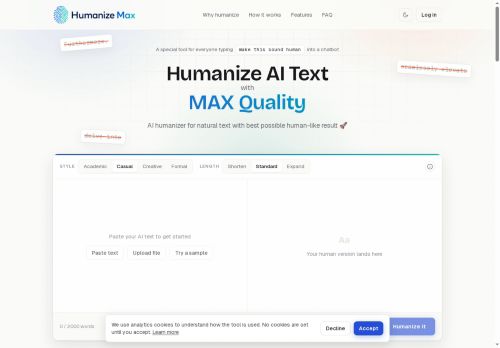
Features include term locking to preserve names and keywords, single-line rephrasing, and unlimited reruns for batch editing and voice consistency across documents.The workflow is three steps.paste or upload, select style and length, and generate a humanized version while preserving original meaning.
Use cases include improving readability, aligning tone for client-facing copy, maintaining keywords for SEO, and unifying phrasing across multi-author drafts.No account is required to use the tool.
Key Features
- Paste text or upload files
- Support for outputs from major LLMs
- Four selectable writing styles (academic, casual, creative, formal)
- Length controls to shorten, expand, or keep text standard
- Term locking to preserve names and keywords
Use Cases
- Humanize AI-generated marketing copy and uploaded campaign briefs into natural, persuasive ads and landing pages in a consistent brand voice using tone presets, term-locking to preserve CTAs and keywords, and length controls to tailor variants for different platforms
- Convert AI drafts or uploaded technical documents into polished, publication-ready papers, reports, or proposals by applying the academic or formal styles, using single-line rephrasing to preserve meaning and citations, and batch rewriting to process multiple sections at once
- Transform blog posts, newsletters, and social content into audience-appropriate tones (casual, creative, formal), unify tone across multi-author material, improve readability while retaining SEO keywords, and generate concise excerpts or social snippets with precise length control
Who is it for?
- Content creators
- Marketing teams
- Seo analysts
- Research scientists
- Freelancers
Based on 9 verified user reviews — Average rating: 3.89/5

@kaylajimenez5662
TurkeyGünlük kullanım sonrası detaylı yorum: Humanizemax AI hız konusunda güçlü, brief netse kalite de iyi. Aynı görevlerde iki alternatifle kıyasladım (blog outline, toplantı notu sadeleştirme, kısa SSS). Humanizemax AI en hızlısıydı ve tonu en az garip olandı. Zayıf yanı uç vakalar — niş jargon ve çok adımlı isteklerde sapabiliyor. Bunu kayıtlı bir stil/prompt rehberiyle çözdüm. Haftada birkaç kez kullanıyorsanız fiyatı makul; değilse ücretsiz katman yetebilir. Freelancer ve küçük ekiplere, güvenilir ilk taslak için öneririm.

@marilynhughes7743
TurkeyVaadettiğini büyük ölçüde yapıyor. Mükemmel değil ama bu kategoride denemeye değer.

@nathantorres3911
TurkeyHumanizemax AI beklediğimden daha iyi. Temiz arayüz ve güvenilir çıktılar.


@isabellabennett3121
TurkeyDetailed take after daily use: Humanizemax AI is strongest on speed and decent on quality when the brief is clear. I tested it against two alternatives on the same tasks (blog outline, meeting notes cleanup, and a short product FAQ). Humanizemax AI was the fastest and produced the least awkward tone. Weak points are edge cases — niche jargon and multi-step instructions sometimes drift. I solved that with a saved prompt style guide. Pricing is okay if you actually use it several times a week; otherwise the free tier may be enough. Overall I would recommend it to freelancers and small teams who need reliable first drafts, not final publish-ready copy every time.
More Paraphraser AI Tools
Explore other paraphraser tools with user ratings, pricing details, and in-depth descriptions. Updated regularly by our editorial team.