
About Renomee AI
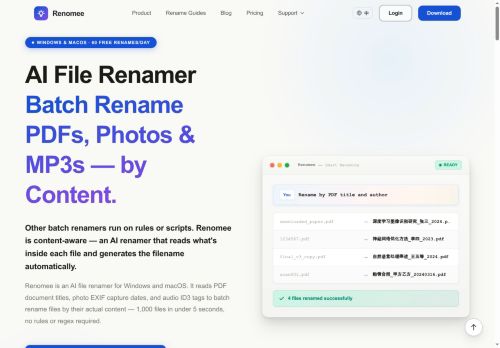
Renomee automates batch file renaming by reading file content and metadata to generate descriptive filenames.
It extracts PDF titles and authors, performs OCR on scanned documents, reads photo EXIF data, and pulls audio ID3 tags to supply filename fields.
Natural-language instructions let you define rename rules without regex, scripts, or coding.
Previews show proposed names before changes are applied, and a queued, parallel processing model provides per-file progress, pause/resume, and cached re-runs.
The tool handles large batches quickly (examples include processing thousands of small files in seconds).
Content extraction runs locally by default, with optional server-based OCR only when needed and with user permission.
Available for Windows and macOS.
Key Features
Use Cases
Who is it for?
It extracts PDF titles and authors, performs OCR on scanned documents, reads photo EXIF data, and pulls audio ID3 tags to supply filename fields.
Natural-language instructions let you define rename rules without regex, scripts, or coding.
Previews show proposed names before changes are applied, and a queued, parallel processing model provides per-file progress, pause/resume, and cached re-runs.
The tool handles large batches quickly (examples include processing thousands of small files in seconds).
Content extraction runs locally by default, with optional server-based OCR only when needed and with user permission.
Available for Windows and macOS.
Key Features
- Automated batch file renaming by reading file content and metadata to generate descriptive filenames
- Content extraction: PDF title/author extraction, OCR for scanned documents, photo EXIF reading, audio ID3 tag parsing
- Natural-language rename rule definition (no regex, scripts, or coding required)
- Queued, parallel processing model with per-file progress, pause/resume, and cached re-runs
- Local-first content extraction with optional server-based OCR performed only with user permission
Use Cases
- Standardize large academic and legal PDF collections with Renomee by extracting PDF titles, authors and OCRed text, write natural-language rules like "LastName_Year_Title", preview changes and batch-apply locally to thousands of files without writing scripts.
- Catalog and rename photography archives using Renomee's EXIF extraction (date, GPS, camera model) to create searchable filenames such as "2024-06-15_NewYork_SonyA7III_0001", preview results, pause/resume long jobs and keep all processing on-device for privacy.
- Organize music, podcast and voice recording libraries by reading ID3 tags or transcribed text with Renomee, define rules like "Artist - Album - Track# - Title", preview renames and bulk-process inconsistent files locally to quickly unify your collection.
Who is it for?
- Archivists and librarians
- Legal professionals and paralegals
- Researchers and academics
- Photographers and photo editors
- Musicians, podcasters, and audio engineers
- Records managers and office administrators
- Digital asset managers and media librarians
- Scanning and digitization operators
- Content creators and journalists
- It administrators and power users
- Students and educators
- Forensic investigators
No review yet!
More File management AI Tools
Explore other file management tools with user ratings, pricing details, and in-depth descriptions. Updated regularly by our editorial team.