
About SpriteSheetMaker
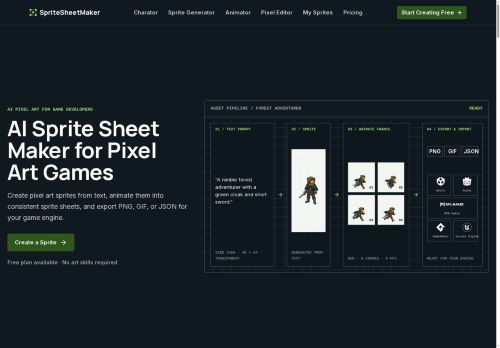
SpriteSheetMaker generates pixel-art sprites from text prompts and assembles them into consistent animated sprite sheets. It converts a single sprite into configurable frame sequences with selectable actions and previewable looping animations.
Included tools—pixel editor, sprite-sheet splitter, GIF-to-sheet and sheet-to-GIF converters, resizer, and atlas builder—support refinement and packaging. Exports provide transparent sprite sheets, looping previews, and frame metadata compatible with common game engines.
The workflow preserves silhouette, proportions, and palette across frames and variants to maintain consistency. Multiple perspective and animation modes cover side-view, top-down, isometric, and four-way turnarounds.
Key Features
Use Cases
Who is it for?
Included tools—pixel editor, sprite-sheet splitter, GIF-to-sheet and sheet-to-GIF converters, resizer, and atlas builder—support refinement and packaging. Exports provide transparent sprite sheets, looping previews, and frame metadata compatible with common game engines.
The workflow preserves silhouette, proportions, and palette across frames and variants to maintain consistency. Multiple perspective and animation modes cover side-view, top-down, isometric, and four-way turnarounds.
Key Features
- Generates pixel-art sprites from text prompts and assembles them into animated sprite sheets
- Converts a single sprite into configurable frame sequences with selectable actions and previewable looping animations
- Built-in tools: pixel editor, sprite-sheet splitter, GIF↔sheet converters, resizer, and atlas builder
- Exports transparent sprite sheets, looping previews, and frame metadata compatible with common game engines
- Preserves silhouette, proportions, and palette across frames and variants and supports side-view, top-down, isometric, and four-way perspectives
Use Cases
- Create consistent, game-ready pixel-art characters and enemy animations from simple text prompts without manual frame-by-frame drawing—generate four-way turnarounds, preserve silhouette/proportions/palette, preview looping actions and export transparent sprite sheets with frame metadata ready for immediate import into game engines.
- Convert animated GIFs or motion references into optimized sprite sheets and packed atlases using the built-in gif-to-spritesheet converter and frame editor; clean up frames, resize assets, and export frame metadata so artists and engineers can drop assets into Unity, Godot or web frameworks.
- Create rapid prototypes of NPCs, props and isometric tilesets by generating text-to-pixel sprites with configurable action presets and looping previews, then use the resizer and atlas tools to produce multi-resolution, transparent exports and sprite atlases for production, UI or marketing assets.
Who is it for?
- Indie game developers
- Pixel artists
- 2d game animators
- Game asset creators and sellers
- Solo hobbyist developers
- Game jam participants
- Modders and community content creators
- Technical artists and pipeline engineers
- Small studio art teams
- Game design students and educators
No review yet!
More Art AI Tools
Explore other art tools with user ratings, pricing details, and in-depth descriptions. Updated regularly by our editorial team.