
About SheetXAI
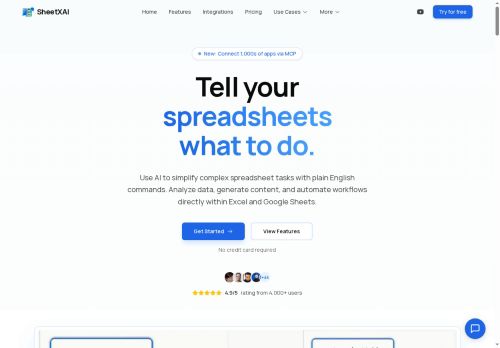
Users can generate bulk content—product descriptions, SEO meta tags, personalized emails—and populate cells with context-aware, multi-language text.sheetxai integrates with apps like Notion, Stripe, HubSpot, and Jira to pull and push data, turning spreadsheets into a central control point for CRM, billing, and project workflows.
Natural language processing converts plain-English requests into instant operations (filter rows, match emails, calculate growth), reducing manual formula work.Target users include analysts, accountants, marketers, sales teams, and operations managers who need no-code automation, fast data extraction, and scalable content generation within spreadsheets.
Key Features
- Natural-language interface converting plain-English requests into spreadsheet operations (filter, match, calculate, etc.)
- Automatic formula generation from natural-language commands
- OCR-based data extraction from PDFs, images, and scanned documents into structured tables and parsed invoices
- Bulk content generation and context-aware multilingual cell population (product descriptions, SEO tags, personalized emails)
- Integrations with Notion, Stripe, HubSpot, and Jira for bi-directional data pull/push and workflow automation
Use Cases
- Automate end-to-end invoice processing with sheetxai by OCR-extracting tables and line items into Google Sheets or Excel, auto-generating reconciliation formulas, categorizing expenses, and pushing validated entries to Notion or accounting systems like Stripe—no coding required
- Turn exported CRM data into actionable sales pipelines using sheetxai's natural-language analysis to generate segmented reports and formulas, create bulk multilingual outreach templates, and sync prioritized leads or tickets with HubSpot and Jira for seamless follow-up
- Create multilingual product catalogs and marketing content from spreadsheet data using sheetxai to auto-generate descriptions, translate at scale, format tables for publishing, schedule no-code workflows to update dashboards, and export or sync assets to Notion or other platforms
Who is it for?
- Data analysts
- Accountants
- Marketers
- Sales teams
- Operations managers
Based on 8 verified user reviews — Average rating: 3.75/5

@elijahcarter5228
TurkeySheetXAI araçını bir hafta denedim ve vazgeçmedim. Kalite ve sadelik dengesi iyi.

@christopherrodriguez
TurkeySheetXAI araçını birkaç haftadır gerçek işlerde deniyorum; sadece demo değil. İlk hafta prompt alışkanlığı kazanmakla geçti. Sonrasında özellikle taslak, e-posta yanıtı ve özet işlerinde süre belirgin düştü. Kusursuz değil: uzun metinlerde yapı bozulabiliyor ve kritik noktaları mutlaka kontrol ediyorum. Yine de yoğun bir haftada düşünmeden açtığım araçlardan biri oldu. Net bir iş akışınız varsa SheetXAI kolay oturuyor. Sıfır düzenlemeyle sihir bekliyorsanız hayal kırıklığı olur. Benim için sıkıcı ara adımları kısaltması yeterli sebep.

@benjaminmorales2037
TurkeyDetailed take after daily use: SheetXAI is strongest on speed and decent on quality when the brief is clear. I tested it against two alternatives on the same tasks (blog outline, meeting notes cleanup, and a short product FAQ). SheetXAI was the fastest and produced the least awkward tone. Weak points are edge cases — niche jargon and multi-step instructions sometimes drift. I solved that with a saved prompt style guide. Pricing is okay if you actually use it several times a week; otherwise the free tier may be enough. Overall I would recommend it to freelancers and small teams who need reliable first drafts, not final publish-ready copy every time.


@charlottemendoza181
Turkeyİlk izlenimim karışıktı, sonra oturdu. Artık haftalık araç setimin parçası.

@rachelclark4266
TurkeyDetailed take after daily use: SheetXAI is strongest on speed and decent on quality when the brief is clear. I tested it against two alternatives on the same tasks (blog outline, meeting notes cleanup, and a short product FAQ). SheetXAI was the fastest and produced the least awkward tone. Weak points are edge cases — niche jargon and multi-step instructions sometimes drift. I solved that with a saved prompt style guide. Pricing is okay if you actually use it several times a week; otherwise the free tier may be enough. Overall I would recommend it to freelancers and small teams who need reliable first drafts, not final publish-ready copy every time.
More Spreadsheets AI Tools
Explore other spreadsheets tools with user ratings, pricing details, and in-depth descriptions. Updated regularly by our editorial team.