
About Photoupscaler AI
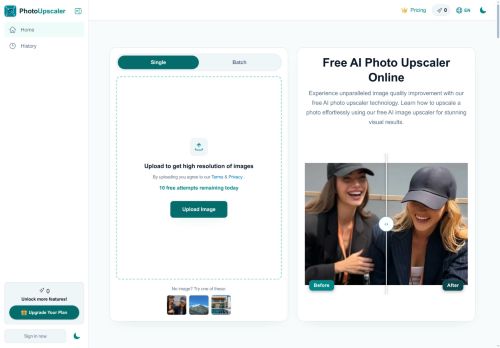
Includes presets for portraits, landscapes, product photos and anime/artwork to adapt enhancement per image type.Provides quick previews and high-resolution downloads suitable for printing, e-commerce listings, and creative projects.
Processes across devices with consistent results and protects images during the enhancement workflow.
Key Features
- AI-based image upscaling to 4K and 8K
- Supports JPG, PNG, WebP, HEIC with single or batch drag-and-drop uploads
- Automatic sharpening, deblurring, and texture and color preservation during enlargement
- Presets for portraits, landscapes, product photos, and anime/artwork to adapt enhancements
- Quick previews and high-resolution downloads; cross-device processing with image protection during workflow
Use Cases
- Improve conversion by creating high-resolution e-commerce product images using Photo Upscaler AI — batch drag-and-drop JPG/PNG/WebP/HEIC files to upscale to 4K/8K, sharpen details and preserve texture/color, apply product-specific presets and download ready-to-publish images for zoomable galleries.
- Deliver gallery-quality portraits and restored photos using Photo Upscaler AI — upscale and denoise low-res or old portraits to 4K/8K, reduce blur while preserving skin texture and color, use portrait presets for consistent results and export high-res files for prints and client delivery.
- Prepare high-res assets for creators and designers using Photo Upscaler AI — batch upscale images for 4K/8K displays, banners, thumbnails and large-format prints, maintain sharpness and color fidelity across formats, speed up workflows with presets and quick high-resolution downloads.
Who is it for?
- Professional photographers
- Amateur and hobbyist photographers
- E-commerce sellers and product photographers
- Graphic designers and creatives
- Digital artists and illustrators (anime/artwork)
- Social media influencers and content creators
- Print shops and publishing professionals
- Marketing teams and advertisers
- Real estate agents and property photographers
- Archivists and photo restoration specialists
Based on 4 verified user reviews — Average rating: 4.25/5

@lindawright3523
TurkeyWhat surprised me about Photoupscaler AI is how little friction there is once you set preferences. I keep a short checklist: audience, tone, must-include points, and forbidden phrases. With that, outputs are consistently usable. Without it, results feel generic. I also like that I can iterate quickly instead of restarting from a blank page. Missing features for me: better version history and clearer export options. Even so, it has replaced a couple of scattered tools in my stack. Rating reflects practical value in my week, not hype from the landing page.

@gregorypeterson8755
TurkeyReliable enough for production drafts. I edit the output, but the first pass is strong.

@laurahughes124
TurkeyImpressed with the speed. I tested it on a real project and it held up well.


@jerryphillips8963
TurkeyUseful features without overwhelming menus. A practical AI addition to my toolkit.
More Image Upscaling AI Tools
Explore other image upscaling tools with user ratings, pricing details, and in-depth descriptions. Updated regularly by our editorial team.