
About OpenTypeless
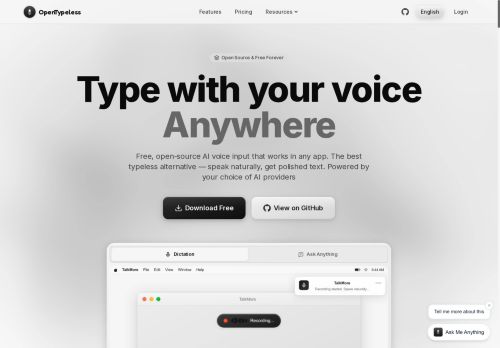
The app supports automatic language detection and 99+ languages, a global hotkey for one-shortcut dictation, session recording, and a searchable history.A custom dictionary handles technical terms, names, and pronunciations for consistent output across domains.
Multiple STT and LLM providers are supported (for example.OpenAI Whisper, Deepgram, AssemblyAI, Google Gemini, Claude, Ollama) with API-key configuration and BYOK options.Typical use cases include dictation across editors and messaging apps, voice prompts for chat models, developer notes in IDEs, accessibility workflows, and multilingual collaboration.
Settings let users choose providers, tune transcription/polish behavior, and control keyboard output mode so text appears in-context in any desktop app.
Key Features
- Cross-platform desktop app that types transcribed speech in-context into any application (keyboard output mode)
- Streaming speech-to-text (live transcription)
- Real-time AI text polishing for grammar, punctuation, and formatting
- Automatic language detection and multilingual support
- Pluggable STT and LLM provider support with API-key configuration and BYOK options
Use Cases
- Create polished, hands-free documents and emails across any desktop app using OpenTypeless's system-wide voice typing and global hotkey — streaming speech-to-text types directly where the cursor is while real-time AI polishing and custom dictionaries ensure correct jargon and professional tone without additional tools
- Write and refactor code inside your IDE using OpenTypeless's IDE voice dictation, streaming voice input straight into your editor with custom dictionaries for variable names/snippets, hotkey control to toggle dictation, and AI polishing to format comments and docstrings for faster, hands-free development
- Capture multilingual meeting notes and live captions in 99+ languages with OpenTypeless's automatic language detection and real-time transcription — stream polished text into note apps or conferencing tools, apply custom dictionaries for names/terms, and switch providers for on-device privacy or cloud accuracy
Who is it for?
- Creative writers
- Software developers
- Prompt engineers
- Student researchers
- Assistive technologists
Based on 7 verified user reviews — Average rating: 4.43/5

@beverlyjohnson8789
TurkeyWhat surprised me about OpenTypeless is how little friction there is once you set preferences. I keep a short checklist: audience, tone, must-include points, and forbidden phrases. With that, outputs are consistently usable. Without it, results feel generic. I also like that I can iterate quickly instead of restarting from a blank page. Missing features for me: better version history and clearer export options. Even so, it has replaced a couple of scattered tools in my stack. Rating reflects practical value in my week, not hype from the landing page.

@karenwright5343
TurkeyHızından etkilendim. Gerçek bir projede denedim ve gayet iyi dayandı.

@sarahthompson2781
TurkeyTried OpenTypeless for a week and it stuck. Good balance of quality and simplicity.


@edwardmiller3829
TurkeyWhat surprised me about OpenTypeless is how little friction there is once you set preferences. I keep a short checklist: audience, tone, must-include points, and forbidden phrases. With that, outputs are consistently usable. Without it, results feel generic. I also like that I can iterate quickly instead of restarting from a blank page. Missing features for me: better version history and clearer export options. Even so, it has replaced a couple of scattered tools in my stack. Rating reflects practical value in my week, not hype from the landing page.

@amywilson306
TurkeyArayüz sezgisel. Denediğim benzer araçlara göre öğrenmesi daha kolay.
More Speech-to-text AI Tools
Explore other speech-to-text tools with user ratings, pricing details, and in-depth descriptions. Updated regularly by our editorial team.