
About FloatBoat AI
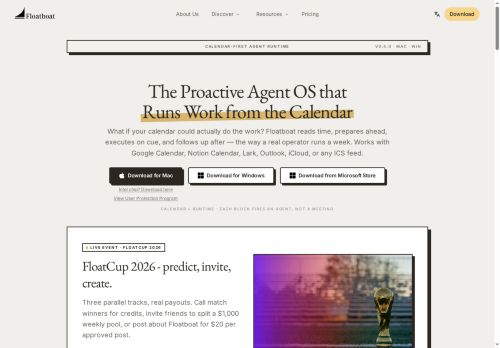
Agents read event context, draft briefs, generate follow-up emails, prepare meeting materials, and create deliverables across tools via 3,500+ integrations including Slack, Gmail, Google Drive, Figma, GitHub, Linear, and local Word/PDF/PPT files.
Permission scopes are configurable per event and per account; agents call real APIs and access local files without re-uploading, with local-first options for on-device processing.Auto mode routes steps across multiple model providers for parsing and reasoning and falls back to alternate providers to prevent mid-run interruptions; users can also select models or supply API keys.
The combo store provides editable, pre-built agent recipes for common workflows—meeting prep, sales follow-ups, PR drafts, ticket drafting—deployable in minutes.Floatim enables group chat channels where local agent instances self-organize roles and exchange artifacts for team collaboration, making the platform suitable for solopreneurs, creators, and small teams seeking calendar automation and workflow orchestration.
Key Features
- Calendar-driven desktop workspace that converts events into persistent agent workspaces with run history, files, model choice, and recorded decisions
- Proactive agents that read event context and autonomously draft briefs, generate follow-up emails, prepare meeting materials, and create deliverables across tools
- Extensive integrations with calendars, apps, and local files (Google Calendar, Outlook, iCloud, Notion, Slack, Gmail, Google Drive, Figma, GitHub, Linear, local Word/PDF/PPT) enabling cross-tool actions without re-uploading
- Configurable permission scopes per event and per account; agents call real APIs and access local files with local-first on-device processing options
- Multi-model orchestration (Auto mode) that routes steps across multiple model providers with fallback to alternate providers; supports user model selection and API key supply
Use Cases
- Automatically generate concise, research-backed meeting briefs, slide decks and talking points for every calendar event using Floatboat's calendar-driven AI agents, pulling context from connected apps and syncing deliverables into a persistent workspace so you arrive prepared without extra manual work
- Automate meeting execution and follow-ups with on-device agents that publish pre-meeting agendas, capture notes, draft and send follow-up emails, create tasks and update project tools, converting each event into a persistent workspace that tracks accountability
- Coordinate team deadlines and recurring workflows by turning calendar events into shared, orchestrated agent workspaces that assign tasks, surface dependencies across connected apps, auto-update stakeholders with status summaries and deliverables, and reduce coordination overhead
Who is it for?
- Designers
- Product managers
- Project managers
- Executives
- Sales representatives
Based on 4 verified user reviews — Average rating: 4.00/5

@matthewwright6501
TurkeyWhat surprised me about FloatBoat AI is how little friction there is once you set preferences. I keep a short checklist: audience, tone, must-include points, and forbidden phrases. With that, outputs are consistently usable. Without it, results feel generic. I also like that I can iterate quickly instead of restarting from a blank page. Missing features for me: better version history and clearer export options. Even so, it has replaced a couple of scattered tools in my stack. Rating reflects practical value in my week, not hype from the landing page.

@isabellabennett3121
TurkeyTaslak üretimi için yeterince güvenilir. Çıktıyı düzenliyorum ama ilk geçiş güçlü.

@laurapatel8678
TurkeyDaha iyi prompt yazınca çıktı kalitesi net yükseldi. Kullanışlı buldum.


@paulsmith566
TurkeyŞimdilik fiyat/performans dengesi iyi. Ücretsiz sürüm değerlendirmek için yeterliydi.
More Meeting assistant AI Tools
Explore other meeting assistant tools with user ratings, pricing details, and in-depth descriptions. Updated regularly by our editorial team.