
About Bubbles
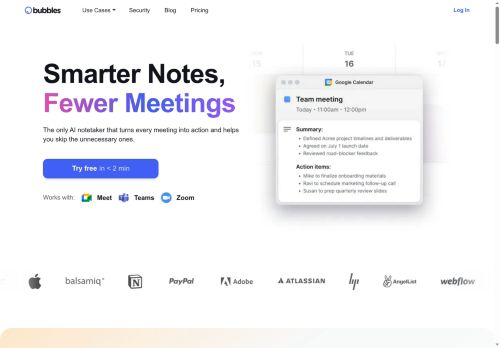
Records meetings and delivers real-time or post-meeting automated transcriptions compatible with Zoom, Google Meet, and Microsoft Teams.
Generates AI summaries that extract decisions, concise takeaways, and actionable items for faster follow-up.
Integrates with Google and Microsoft calendars to link notes to events and automatically join scheduled meetings.
Stores notes in a searchable workspace with tagging, templates, and structured exports for consistent documentation.
Key Features
- Automatic meeting joining and recording via Google or Microsoft Calendar integration
- Real-time transcription of meetings
- AI-generated concise summaries and action items
- Integrations with Zoom, Google Meet, Microsoft Teams, email, and Slack
- Organized, searchable workspace for storing notes and transcripts
Use Cases
- Capture and share concise, AI-generated meeting summaries using Bubbles without manual note-taking, with automated transcripts that highlight decisions, takeaways and action items and automatically link notes to Google/Microsoft calendars while pushing summaries to Slack, email or your PM tools for immediate follow-up
- Build a searchable meeting workspace that aggregates recordings and post-meeting transcripts from Zoom, Meet and Teams using Bubbles, enabling new hires to onboard faster, stakeholders to find past decisions quickly and teams to tag, filter and reference meeting content across projects
- Automate recurring standups, client calls and sprint retros with Bubbles to transcribe in real-time or post-meeting, extract owners, deadlines and action items as assignable tasks, sync them to Jira/Asana/Trello and surface reminders in calendars and Slack for seamless cross-team coordination
Who is it for?
- Remote workers
- Project managers
- Team leaders
- Business professionals
- Meeting participants
- Administrative assistants
Based on 10 verified user reviews — Average rating: 3.80/5

@bettyjones2198
TurkeyWhat surprised me about Bubbles is how little friction there is once you set preferences. I keep a short checklist: audience, tone, must-include points, and forbidden phrases. With that, outputs are consistently usable. Without it, results feel generic. I also like that I can iterate quickly instead of restarting from a blank page. Missing features for me: better version history and clearer export options. Even so, it has replaced a couple of scattered tools in my stack. Rating reflects practical value in my week, not hype from the landing page.

@susanrichardson6522
TurkeyMenü kalabalığı yok, özellikler işe yarıyor. Pratik bir AI katkısı.

@samanthalopez8206
TurkeyArayüz sezgisel. Denediğim benzer araçlara göre öğrenmesi daha kolay.


@stephaniewood5339
TurkeyGüzel bir keşif. Dokümantasyon biraz daha net olabilirdi ama öğrenince verimli.

@laurenbennett5232
TurkeyNeeds serious improvement. Slow, inconsistent, and customer support was unhelpful.
More Meeting assistant AI Tools
Explore other meeting assistant tools with user ratings, pricing details, and in-depth descriptions. Updated regularly by our editorial team.