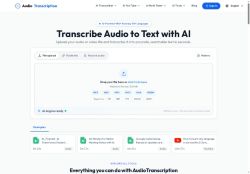

About Audio Transcription
Outputs include timestamps, speaker labels, and exports to txt, docx, srt, vtt, pdf, and json for subtitle creation and content reuse.The tool offers automatic audio extraction from video files, a maximum 500 MB upload size, and an inline editor that plays audio by word for quick correction.
Built-in keyword search and timestamped transcripts help journalists, researchers, teams, and educators locate quotes, generate summaries, and create notes without replaying recordings.Encrypted processing and file deletion options address basic data security needs.
Fast turnaround and format-ready exports support SEO optimization, accessibility, and repurposing spoken content into blog posts, captions, and searchable archives.
Key Features
- Transcribes audio and video files (mp3, wav, m4a, mp4, mov, webm) into text
- Supports 50+ languages with automatic language detection
- Generates timestamps and speaker labels and exports to txt, docx, srt, vtt, pdf, and json
- Inline editor with word-level audio playback for quick correction
- Encrypted processing and configurable file deletion (data security)
Use Cases
- Transcribe interviews, meetings and focus groups with audiotranscription.io into high-accuracy, timestamped transcripts with automatic speaker labels and inline word-level editing, then export to DOCX/PDF for sharing and create searchable transcript archives for compliance and knowledge management
- Generate SEO- and accessibility-friendly captions and subtitles for videos and podcasts using audiotranscription.io’s multilingual automatic detection and SRT/VTT export, preserving timestamps and speaker info to boost discoverability and viewer engagement
- Convert podcast episodes into multilingual, keyword-searchable transcripts and episode show notes with audiotranscription.io, use the inline editor and JSON export to repurpose content into blog posts, social clips and summaries while keeping processing encrypted for privacy
Who is it for?
- Podcasters
- Media producers
- Corporate teams
- Educators
- Students
Based on 7 verified user reviews — Average rating: 3.86/5

@russellwalker1745
TurkeyI have been using Audio Transcription for a few weeks on real client work, not just demos. The first week was mostly learning prompts and figuring out which templates stick. After that, drafting time dropped noticeably — especially for outlines, email replies, and first-pass summaries. It is not flawless: long documents sometimes lose structure, and I still fact-check anything important. Still, for a busy week it has become one of the tools I open without thinking. If you already have a clear workflow, Audio Transcription fits in cleanly. If you expect magic with zero editing, you will be disappointed. For me, the time saved on the boring middle steps is worth it.

@jonathanscott9892
TurkeyAudio Transcription araçını birkaç haftadır gerçek işlerde deniyorum; sadece demo değil. İlk hafta prompt alışkanlığı kazanmakla geçti. Sonrasında özellikle taslak, e-posta yanıtı ve özet işlerinde süre belirgin düştü. Kusursuz değil: uzun metinlerde yapı bozulabiliyor ve kritik noktaları mutlaka kontrol ediyorum. Yine de yoğun bir haftada düşünmeden açtığım araçlardan biri oldu. Net bir iş akışınız varsa Audio Transcription kolay oturuyor. Sıfır düzenlemeyle sihir bekliyorsanız hayal kırıklığı olur. Benim için sıkıcı ara adımları kısaltması yeterli sebep.
More Transcriber AI Tools
Explore other transcriber tools with user ratings, pricing details, and in-depth descriptions. Updated regularly by our editorial team.