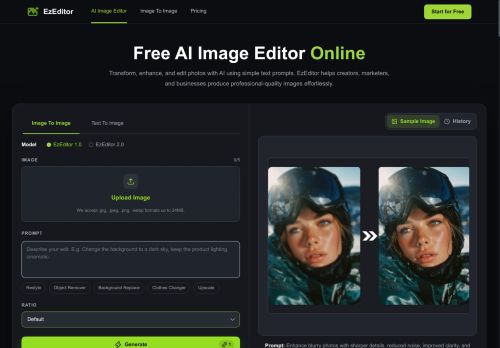

About EzEditor.ai
The editor accepts JPG, JPEG, PNG, and WEBP files up to 24 MB and offers batch processing and adjustable output aspect ratios.A multi-model engine and style transfer/blending options enable varied visual styles and mixed artistic effects.
The web-based editor works in-browser without software installation and delivers fast, high-resolution exports suitable for ecommerce, social media, and print.Uploaded images are processed securely and not shared with third parties.
Typical workflow.upload an image, enter a text prompt to describe edits, refine results, and download the final image.
Key Features
- Natural-language prompt-driven image editing and enhancement
- Supports edits including background replacement, object removal, restyling, clothing changes, and upscaling
- Accepts JPG/JPEG/PNG/WEBP files up to 24 MB, with batch processing and adjustable output aspect ratios
- Multi-model engine with style transfer and blending options for mixed visual styles
- Web-based in-browser editor with high-resolution export and secure, non-shared image processing (no installation required)
Use Cases
- Create professional product photos for your online store using ezeditor's prompt-driven editor to replace backgrounds, change clothing/colors, batch-process JPG/PNG/WEBP files, and upscale images to marketplace resolution requirements while maintaining consistent aspect ratios without advanced photo-editing skills
- Produce eye-catching social media content and reels by restyling portraits with multi-model style blending, removing unwanted objects, replacing backgrounds, and exporting platform-ready sizes using adjustable aspect ratios and in-browser upscaling for crisp thumbnails
- Improve real estate and listing photography by removing clutter, swapping skies and backgrounds, batch-processing multiple rooms to enforce consistent framing and aspect ratios, and upscaling final images for high-quality listings quickly via natural-language prompts
Who is it for?
- Graphic designers
- Content creators
- Product photographers
- Social media influencers
- E-commerce sellers
Based on 9 verified user reviews — Average rating: 3.78/5
@logangomez2293
TurkeyReally useful for my workflow. Setup was quick and the results were better than I expected.
@sarahthompson2781
TurkeyTried it on a real task and failed. Results looked AI-sloppy and needed full rewrites.
@brittanycarter5746
TurkeyEzEditor.ai araçını birkaç haftadır gerçek işlerde deniyorum; sadece demo değil. İlk hafta prompt alışkanlığı kazanmakla geçti. Sonrasında özellikle taslak, e-posta yanıtı ve özet işlerinde süre belirgin düştü. Kusursuz değil: uzun metinlerde yapı bozulabiliyor ve kritik noktaları mutlaka kontrol ediyorum. Yine de yoğun bir haftada düşünmeden açtığım araçlardan biri oldu. Net bir iş akışınız varsa EzEditor.ai kolay oturuyor. Sıfır düzenlemeyle sihir bekliyorsanız hayal kırıklığı olur. Benim için sıkıcı ara adımları kısaltması yeterli sebep.

@hannahgonzalez8679
TurkeyExactly what I needed for quick iterations. Recommend for freelancers and small teams.
@joyceroberts9177
TurkeyDaha iyi prompt yazınca çıktı kalitesi net yükseldi. Kullanışlı buldum.
More Photo editing AI Tools
Explore other photo editing tools with user ratings, pricing details, and in-depth descriptions. Updated regularly by our editorial team.