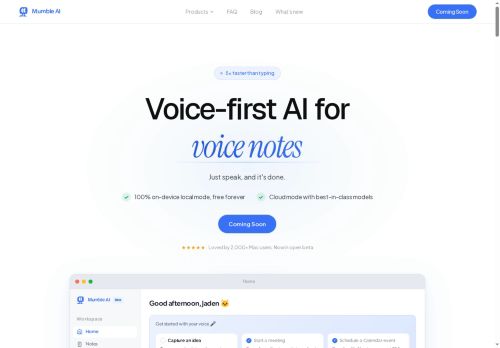

About Mumble AI
Offers 100% on-device local mode for recording and transcription plus an optional cloud mode for multi-language processing and faster summaries (50+ languages).System-wide dictation with formatting shortcuts (arrow keys) and integrations for calendar sync, call joining, and automated meeting detection.
Designed for product teams, marketers, executives and researchers who need searchable transcripts, concise meeting summaries and automated task capture.
Key Features
- Voice-first meeting notes, voice notes and dictation for Mac
- Real-time transcription with speaker labels and live transcripts
- Automated structured summaries, action item extraction and customizable note templates with export
- 100% on-device local recording/transcription mode and optional cloud mode for multi-language processing
- System-wide dictation with formatting shortcuts and integrations for calendar sync, call joining and automated meeting detection
Use Cases
- Create concise, speaker-labeled meeting summaries with automated action items and follow-ups using Mumble's real-time transcripts and calendar integrations, eliminating manual note-taking and syncing tasks to calendars
- Record and transcribe sensitive calls locally on-device (Mac) for privacy, producing searchable, compliance-ready transcripts and timestamped notes for legal, HR, or board meetings
- Transcribe and translate multilingual calls in real time with Mumble's optional cloud processing, then use system-wide dictation to draft polished follow-up emails, briefs, or documentation for global teams
Who is it for?
- Content creators
- Product managers
- Marketing managers
- Executive leaders
- Research analysts
Based on 5 verified user reviews — Average rating: 3.80/5

@abigailrivera1147
TurkeyArayüzü temiz, çıktı kalitesi iyi. Günlük işlerimde sık kullanıyorum.

@bettygonzalez9600
TurkeyGünlük kullanım sonrası detaylı yorum: Mumble AI hız konusunda güçlü, brief netse kalite de iyi. Aynı görevlerde iki alternatifle kıyasladım (blog outline, toplantı notu sadeleştirme, kısa SSS). Mumble AI en hızlısıydı ve tonu en az garip olandı. Zayıf yanı uç vakalar — niş jargon ve çok adımlı isteklerde sapabiliyor. Bunu kayıtlı bir stil/prompt rehberiyle çözdüm. Haftada birkaç kez kullanıyorsanız fiyatı makul; değilse ücretsiz katman yetebilir. Freelancer ve küçük ekiplere, güvenilir ilk taslak için öneririm.

@annsanchez3533
TurkeyImpressed with the speed. I tested it on a real project and it held up well.


@jerrylee9845
TurkeyBelow expectations. Occasional useful bits, but too many errors to trust for real work.

@georgelopez8864
TurkeyDetailed take after daily use: Mumble AI is strongest on speed and decent on quality when the brief is clear. I tested it against two alternatives on the same tasks (blog outline, meeting notes cleanup, and a short product FAQ). Mumble AI was the fastest and produced the least awkward tone. Weak points are edge cases — niche jargon and multi-step instructions sometimes drift. I solved that with a saved prompt style guide. Pricing is okay if you actually use it several times a week; otherwise the free tier may be enough. Overall I would recommend it to freelancers and small teams who need reliable first drafts, not final publish-ready copy every time.
More Transcriber AI Tools
Explore other transcriber tools with user ratings, pricing details, and in-depth descriptions. Updated regularly by our editorial team.