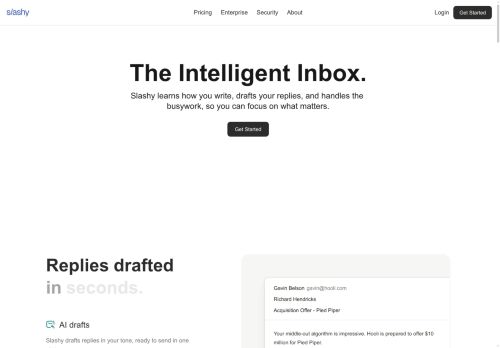

About Slashy
A unified inbox and calendar view consolidate multiple accounts, surface priority messages with auto-labeling, and display open and device activity to inform follow-up decisions.Scheduling tools insert availability, enable one-click meeting booking through integrations like Calendly, and let users check calendar availability without leaving the inbox.
Snippets, templates, and a keyboard-first command palette support faster responses and repeatable workflows for individuals and teams.Integrations with HubSpot, GitHub, and common calendar providers help sync CRM and development workflows.
Memory and personalization learn writing preferences and automate recurring tasks such as investor updates and support replies.Security features include AES-256 encryption and SOC 2 Type II compliance, and AI interactions are configured not to be used for model training per provider settings.
Key Features
- AI email assistant that drafts replies, triages messages, and manages follow-ups
- Inline AI editor that rewrites, shortens, changes tone, and generates send-ready drafts
- Unified inbox and calendar view consolidating multiple accounts with auto-labeling and open/device activity visibility
- Scheduling tools that insert availability, enable one-click meeting booking via integrations (e.g., Calendly), and check calendar availability from the inbox
- Security and privacy controls: AES-256 encryption, SOC 2 Type II compliance, and AI interactions configured not to be used for model training
Use Cases
- Automate triage and reply drafting for a high-volume support inbox using Slashy to categorize and prioritize messages, generate personalized or templated responses, rewrite or change tone inline, and schedule automated follow-ups while keeping data protected with AES-256 encryption and SOC 2 compliance
- Create scalable sales outreach sequences by using Slashy’s templates and inline AI editor to craft and A/B test personalized emails, sync replies with your calendar for automated meeting scheduling, and integrate follow-up automation with your CRM for seamless pipeline management
- Unify multiple inboxes and calendars for executives or teams so Slashy can draft concise replies, manage follow-ups and snoozes, personalize communications at scale, and leverage integrations and secure encryption to handle sensitive scheduling and correspondence
Who is it for?
- Busy executives
- Sales representatives
- Customer support teams
- Executive assistants
- Product managers
Based on 8 verified user reviews — Average rating: 3.88/5

@patrickjones2452
TurkeyImpressed with the speed. I tested it on a real project and it held up well.

@ethanhall7611
TurkeyArayüz sezgisel. Denediğim benzer araçlara göre öğrenmesi daha kolay.

@carlbrooks5175
TurkeyDaha iyi prompt yazınca çıktı kalitesi net yükseldi. Kullanışlı buldum.


@gabrielnguyen7847
TurkeyWhat surprised me about Slashy is how little friction there is once you set preferences. I keep a short checklist: audience, tone, must-include points, and forbidden phrases. With that, outputs are consistently usable. Without it, results feel generic. I also like that I can iterate quickly instead of restarting from a blank page. Missing features for me: better version history and clearer export options. Even so, it has replaced a couple of scattered tools in my stack. Rating reflects practical value in my week, not hype from the landing page.

@lisawhite4309
TurkeyPerformance is consistent. I have not hit major bugs in two weeks of use.
More Email AI Tools
Explore other email tools with user ratings, pricing details, and in-depth descriptions. Updated regularly by our editorial team.