
About MagicPixel
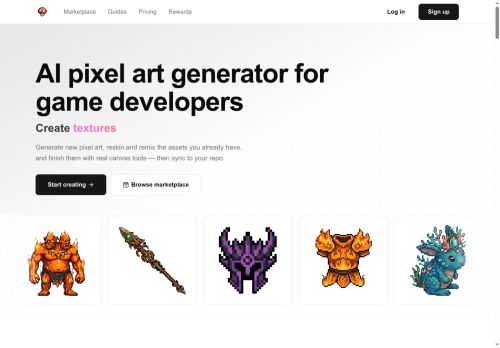
MagicPixel is a pixel art generator and editor for game developers that creates game-ready sprites, tiles, UI icons and environments from text prompts or image sources.Generations land on a real pixel grid with editable layers, palette control, pixel-perfect tools and per-frame animation support so developers can fine-tune assets directly on the canvas.
Features include silhouette-preserving reskins and variants, palette remapping, and matching asset sets that share palette, lighting, scale and rendering style for cohesive item and character collections.
Export options produce PNG sprite sheets and per-frame PNGs ready for Unity, Godot, GameMaker, Phaser, Bevy and LÖVE.Import and edit.aseprite,.ase,.png and animated GIF files with frames, layers and tags preserved; import palettes (.
gpl,.hex,.pal) and enforce strict color counts.A CLI syncs assets into project folders with renames, version bumps and deletions handled, while an MCP endpoint enables automated generation via Claude, ChatGPT, Cursor and GitHub Copilot.
Target resolutions span 16×16 to 1024×1024 with configurable brush sizes and fixed-color generation (8–256) to meet pixel-art workflow constraints.
Key Features
Use Cases
Who is it for?
Features include silhouette-preserving reskins and variants, palette remapping, and matching asset sets that share palette, lighting, scale and rendering style for cohesive item and character collections.
Export options produce PNG sprite sheets and per-frame PNGs ready for Unity, Godot, GameMaker, Phaser, Bevy and LÖVE.Import and edit.aseprite,.ase,.png and animated GIF files with frames, layers and tags preserved; import palettes (.
gpl,.hex,.pal) and enforce strict color counts.A CLI syncs assets into project folders with renames, version bumps and deletions handled, while an MCP endpoint enables automated generation via Claude, ChatGPT, Cursor and GitHub Copilot.
Target resolutions span 16×16 to 1024×1024 with configurable brush sizes and fixed-color generation (8–256) to meet pixel-art workflow constraints.
Key Features
- Generate game-ready pixel art (sprites, tiles, UI icons, environments) from text prompts or image sources
- Pixel-perfect editor with a real pixel grid, editable layers, palette control, configurable brush sizes, and per-frame animation support
- Silhouette-preserving reskins and variants, palette remapping, and strict color-count enforcement for fixed-color generation
- Import/export support: import .aseprite/.ase/.png and animated GIFs with frames/layers/tags preserved; import palettes (.gpl, .hex, .pal); export PNG sprite sheets and per-frame PNGs for game engines
- Automation and integration: CLI to sync assets into project folders with renames/version bumps/deletions, and an MCP endpoint for automated generation via AI tools
Use Cases
- Create pixel-perfect layered character sprites and per-frame animations from text prompts or concept images using MagicPixel, control palettes and remap colors for consistent art direction, then export engine-ready PNGs or .aseprite files for immediate import into Unity or Godot
- Rapidly produce cohesive tilemaps, environment tiles and UI elements that match an existing asset-set using MagicPixel's asset-set matching and palette remapping, export optimized sprite sheets and layered tilesets to speed level design
- Automate your art pipeline by batch-generating and editing sprite sheets, animated frames and seasonal skin variants via MagicPixel's CLI or API, integrate into CI/CD to produce engine-ready assets with consistent palettes and naming conventions
Who is it for?
- Pixel artists
- Indie game developers
- 2d sprite animators
- Tile designers
- Ui/ux game designers
No review yet!
More Gaming AI Tools
Explore other gaming tools with user ratings, pricing details, and in-depth descriptions. Updated regularly by our editorial team.