
About VideoFaceSwap.com
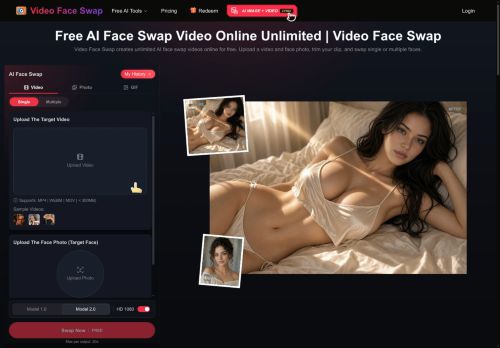
Video Face Swap replaces faces in uploaded videos using an AI-based frame-by-frame process.Upload a source video and a replacement face photo, trim the clip to the desired segment, and choose single- or multiple-face modes for group footage.
Built-in face detection identifies visible people and lets you assign distinct replacement photos to each detected face.Preview and adjust the generated result in the browser, then download the final output.
The tool supports GIF and image swaps in addition to video outputs and processes frames to keep facial motion consistent.Use clear, well-lit source media and matching face angles to improve alignment and reduce artifacts, and review the result before publishing.
Key Features
Use Cases
Who is it for?
Built-in face detection identifies visible people and lets you assign distinct replacement photos to each detected face.Preview and adjust the generated result in the browser, then download the final output.
The tool supports GIF and image swaps in addition to video outputs and processes frames to keep facial motion consistent.Use clear, well-lit source media and matching face angles to improve alignment and reduce artifacts, and review the result before publishing.
Key Features
- AI-based frame-by-frame face replacement for videos
- Built-in face detection with per-face assignment of replacement photos
- Single-face and multiple-face modes for group footage
- Clip trimming to select desired video segments
- In-browser preview and adjustment with downloadable outputs; supports video, GIF, and image swaps
Use Cases
- Create professional-looking marketing and demo videos by swapping a spokesperson's face into existing footage using Video Face Swap's frame-by-frame replacement, preview and fine-tune outputs in-browser, then download high-quality MP4s or GIFs ready for campaigns
- Produce seamless film or short‑form VFX shots by replacing or de‑aging actors' faces—use multi-face mode to handle group scenes and preserve face motion consistency, adjust frames and export image sequences or video for post‑production
- Generate localized or privacy-safe content by swapping presenter faces for regional hosts or anonymized avatars in interviews and tutorials, use single- or multi-face modes to keep natural motion, preview edits in-browser and export GIFs, images, or video for social channels
Who is it for?
- Social media creators and influencers
- Youtubers and vloggers
- Short-form video creators (tiktok/reels)
- Video editors and vfx artists
- Independent filmmakers and producers
- Marketing and advertising teams
- Digital artists and hobbyists (meme makers)
- Educators and trainers creating demos
No review yet!
More Video Editing AI Tools
Explore other video editing tools with user ratings, pricing details, and in-depth descriptions. Updated regularly by our editorial team.