
About Genjutsu AI
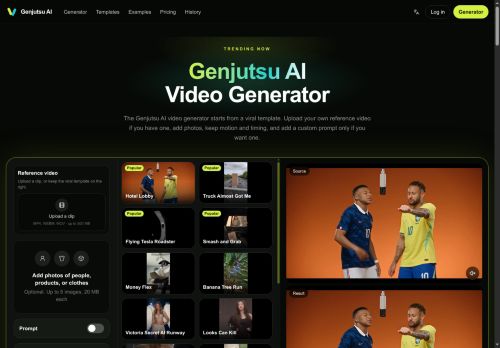
Genjutsu AI is an AI video generator that creates publishable cuts from viral templates or your own reference video. It preserves recorded motion, timing, choreography, and camera intent while restyling set, wardrobe, product presentation, and atmosphere.
Upload photos and optionally add a text prompt to specify which elements should change without altering the original performance. The web-based generator manages renders, previews, history, and credits in a single interface and returns credits automatically for failed generations.
Produce multiple visual variants from a single take for ads, Shorts, Reels, or localized cuts without a reshoot. Download previewed masters and iterate on styling and scene elements directly within the generator.
Key Features
Use Cases
Who is it for?
Upload photos and optionally add a text prompt to specify which elements should change without altering the original performance. The web-based generator manages renders, previews, history, and credits in a single interface and returns credits automatically for failed generations.
Produce multiple visual variants from a single take for ads, Shorts, Reels, or localized cuts without a reshoot. Download previewed masters and iterate on styling and scene elements directly within the generator.
Key Features
- Generate publishable cuts from viral templates or user reference videos
- Preserve recorded motion, timing, choreography, and camera intent while restyling set, wardrobe, product presentation, and atmosphere
- Accept uploaded photos and optional text prompts to specify element changes without altering the original performance
- Web-based generator that manages renders, previews, history, and credits with automatic credit refunds for failed generations
- Produce multiple visual variants from a single take, download previewed masters, and iterate on styling and scene elements within the generator
Use Cases
- Produce reshoot-free ad variants by restyling set, wardrobe, product presentation and atmosphere from existing footage or viral templates while preserving choreography and motion, enabling rapid A/B testing of creatives without new shoots
- Turn long-form footage or user-generated clips into platform-optimized short reels and TikToks using template-based viral cuts and motion-preserving edits, previewing and iterating in a web-based interface to maximize engagement
- Generate multiple visual variants of a campaign—altering styling, color grading, and environment via reference-based video restyle—and use the preview render manager to iterate with stakeholders and finalize publishable cuts without reshoots
Who is it for?
- Social media marketers
- Content creators and influencers
- Advertisers and ad agencies
- E-commerce and product marketers
- Video editors and post-production teams
- Creative agencies
- Localization and growth marketing teams
- Freelance videographers and editors
- Small businesses and startups
- Performance artists and choreographers
No review yet!
More Video AI Tools
Explore other video tools with user ratings, pricing details, and in-depth descriptions. Updated regularly by our editorial team.