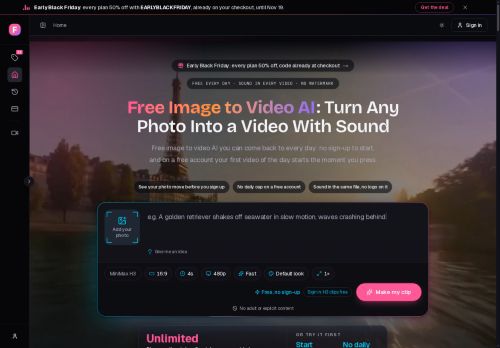

About freeimagetovideo.ai
Converts a single photo or a short text prompt into an AI-generated video with embedded audio. Start without signing up; a free account produces unlimited short clips with no watermark. Upload an image or type a scene, describe what should move and what should be heard, then render and download directly in the browser.
Videos are saved in a history for later access and iterative edits. Rendering is server-side, so no local software or GPU is required. Paid plans extend clip length and visual quality, add commercial-use rights, and enable multiple concurrent renders.
Options include requesting multiple takes and refining prompts for new versions.
Key Features
Use Cases
Who is it for?
Videos are saved in a history for later access and iterative edits. Rendering is server-side, so no local software or GPU is required. Paid plans extend clip length and visual quality, add commercial-use rights, and enable multiple concurrent renders.
Options include requesting multiple takes and refining prompts for new versions.
Key Features
- Converts a single photo or a short text prompt into an AI-generated video with embedded audio
- In-browser workflow: upload an image or type a scene, then render and download directly in the browser
- Server-side rendering (no local software or GPU required)
- History saving with access to previously generated videos and iterative edits/versioning
- Supports requesting multiple takes and prompt refinements; paid options enable longer/higher-quality clips, commercial-use rights, and multiple concurrent renders
Use Cases
- Turn a product photo into a short, watermark-free animated promo with embedded voiceover and music directly in your browser, iterating via saved history and multiple takes to optimize creative angles for social ads
- Convert a bullet-point script or short text prompt into a narrated explainer or tutorial video with embedded audio and no local GPU required, refining the output through prompt tweaks and version history for polished e-learning clips
- Animate family photos or event shots into shareable mini-movies with background music and voice narration, using server-side rendering to export high-quality, no-watermark clips and replay past edits to create alternative takes for different platforms
Who is it for?
- Social media creators and influencers
- Small business owners and marketers
- Photographers and visual artists
- Indie filmmakers and video creators
- Content creators and vloggers
- Educators and teachers
- Freelance designers and creative agencies
- Hobbyists and casual users (meme-makers)
- Game developers and prototypers
- Podcasters and musicians wanting visual clips
No review yet!
More Video AI Tools
Explore other video tools with user ratings, pricing details, and in-depth descriptions. Updated regularly by our editorial team.