About Veo-Online.ai
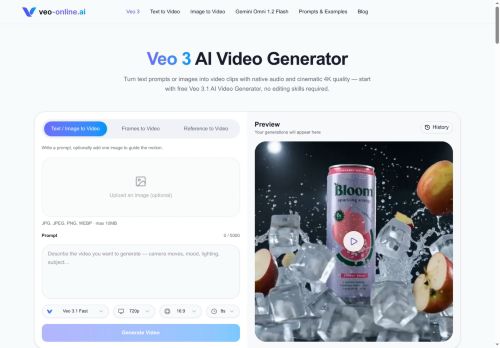
Veo 3 AI Video Generator converts text prompts and images into short video clips with synchronized native audio and consistent visuals. It supports text-to-video, image-to-video, frame-based inputs, and reference images within a single workspace.
The generator produces aligned dialogue, ambient sound, and effects alongside visuals so audio and mouth movement remain synchronized. Models preserve character identity, lighting, and realistic motion across shots to reduce artifacts and maintain continuity.
A built-in prompt library offers editable examples for scenes, camera moves, and styles to speed up iteration. Multiple model variants provide options that prioritize speed, variation, or controlled framing depending on production needs.
Key Features
Use Cases
Who is it for?
The generator produces aligned dialogue, ambient sound, and effects alongside visuals so audio and mouth movement remain synchronized. Models preserve character identity, lighting, and realistic motion across shots to reduce artifacts and maintain continuity.
A built-in prompt library offers editable examples for scenes, camera moves, and styles to speed up iteration. Multiple model variants provide options that prioritize speed, variation, or controlled framing depending on production needs.
Key Features
- Support for text-to-video, image-to-video, frame-based inputs, and reference images within a single workspace
- Generates synchronized native audio (aligned dialogue, ambient sound, and effects) with lip-synced mouth movement
- Preserves character identity, lighting, and realistic motion across shots to maintain visual continuity
- Built-in editable prompt library with scene, camera-move, and style examples for rapid iteration
- Multiple model variants optimized for speed, variation, or controlled framing
Use Cases
- Create short, character-driven product demo videos from a script and a reference image using Veo 3’s text-to-video and image-to-video inputs, with lip-synced native audio, preserved character identity and consistent lighting across multi-shot sequences — use the editable prompt library and model variants to iterate fast or tighten framing.
- Produce personalized, multilingual marketing clips and ads by turning copy into short videos with realistic motion and synchronized audio, preserving brand character across scenes; leverage prompt templates for A/B variations and the controlled model variant for exact framing.
- Generate story-driven social media shorts and episodic content that keep character continuity and lighting across cuts, using frame-based inputs or prompts for complex multi-shot continuity, quick prototyping with the speed model, and refined outputs via the editable prompt library.
Who is it for?
- Social media creators
- Content marketers
- Advertisers and ad agencies
- Independent filmmakers and video producers
- Animation and vfx artists
- Game developers and narrative designers
- E-learning creators and educators
- Small production studios
- Product teams and ux designers
- Freelance video editors and motion designers
No review yet!
More Video AI Tools
Explore other video tools with user ratings, pricing details, and in-depth descriptions. Updated regularly by our editorial team.