About Noriva
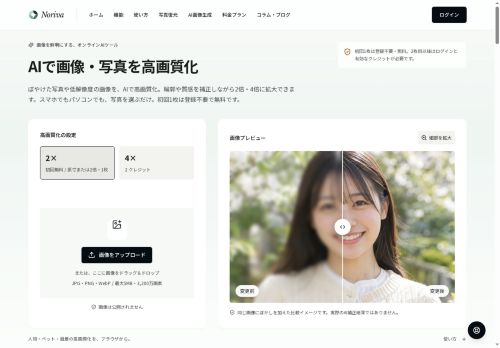
Noriva is an online AI image-enhancement tool that restores detail and sharpness in photos through neural-based correction and upscaling.
It supports selectable upscaling levels (2× and 4×) to increase image size while estimating and reconstructing contours, textures, faces, and text.
Processing is browser-based with no installation; users upload images, apply enhancement, and review results directly in the interface.
A before-and-after slider and preview modes allow inspection at full and overall views to verify facial features, text legibility, and fine patterns prior to download.
Enhanced outputs and original images are retained for a limited access period, and the service provides processing status and error guidance for input issues.
Key Features
Use Cases
Who is it for?
It supports selectable upscaling levels (2× and 4×) to increase image size while estimating and reconstructing contours, textures, faces, and text.
Processing is browser-based with no installation; users upload images, apply enhancement, and review results directly in the interface.
A before-and-after slider and preview modes allow inspection at full and overall views to verify facial features, text legibility, and fine patterns prior to download.
Enhanced outputs and original images are retained for a limited access period, and the service provides processing status and error guidance for input issues.
Key Features
- Neural-based image restoration and sharpening
- Selectable 2× and 4× upscaling with reconstruction of contours, textures, faces, and text
- Browser-based processing with upload, enhancement, and in-interface review (no installation)
- Before-and-after slider and preview modes offering full and overall views for inspection
- Temporary retention of original and enhanced images plus processing status updates and error guidance
Use Cases
- Restore and upscale old family photos in your browser—Noriva reconstructs faces, contours and textures and offers 2×/4× upscaling with before/after previews and temporary file retention so you can recover sharp, printable memories without installing software
- Prepare product or event photos for large-format prints and high-resolution catalogs by using Noriva's 4× upscaler and neural detail restoration to sharpen textures, edges and embedded text while monitoring progress with status feedback and instant previews
- Make scanned documents, screenshots and low-res text legible for archives or OCR by enhancing text clarity and contrast with Noriva's browser-based AI, previewing improvements before download and keeping files temporarily for quick iterations
Who is it for?
- Amateur photographers
- Professional photographers
- Social media influencers and content creators
- E-commerce sellers and product photographers
- Graphic designers and digital artists
- Photo restoration enthusiasts and archivists
- Real estate agents and property marketers
- Journalists and reporters
- Print designers and marketing teams
- Law enforcement and forensic analysts
No review yet!
More Image Upscaling AI Tools
Explore other image upscaling tools with user ratings, pricing details, and in-depth descriptions. Updated regularly by our editorial team.