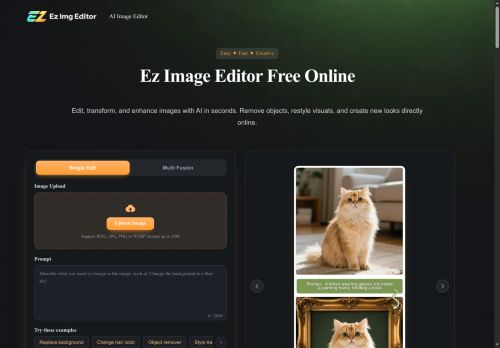

About EzImgEditor
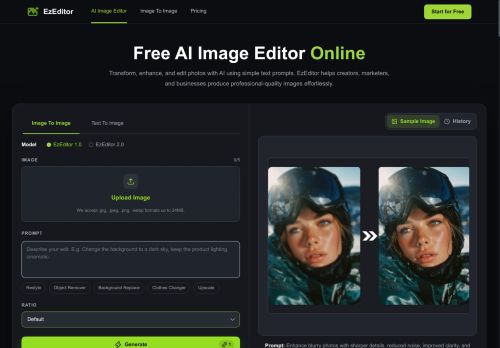
Supports single-image edits and multi-image blending with text-prompt controls and common aspect ratios.Accepts JPEG, JPG, PNG and WebP formats and provides selective adjustments for color, lighting, and facial detail.
Use cases include e-commerce product shots, real estate and interior design mockups, social media content and influencer feeds, and LinkedIn/resume headshots.Tools aim to speed image workflows, create consistent product or profile visuals, and combine multiple photos into custom compositions without desktop software.
Key Features
- Object removal
- Background replacement
- Hair and color changes
- Style transfer
- Old-photo restoration
Use Cases
- Prepare polished product photos for your online store by removing unwanted objects, replacing backgrounds with consistent studio or lifestyle scenes, and using selective color and lighting adjustments plus multi-image blending to create cohesive brand-ready images
- Restore and enhance old family photos by removing scratches and stains, performing facial and color restoration, applying style transfer to modernize tones, and blending multiple scans to reconstruct damaged areas for high-quality prints
- Create attention-grabbing social and marketing visuals by swapping backgrounds, changing hair or clothing color with text-prompt controls, removing distractions, applying stylistic filters, and exporting in common aspect ratios optimized for ads and social platforms
Who is it for?
- Graphic designers
- Interior designers
- Product photographers
- Content creators
- Social media managers
Based on 9 verified user reviews — Average rating: 3.67/5

@debracook4582
TurkeyBaşlangıç için olur. Çok düzenliyorum ama boş sayfadan iyidir.

@keithcook557
TurkeyArayüzü temiz, çıktı kalitesi iyi. Günlük işlerimde sık kullanıyorum.

@ruthhernandez796
Turkeyİş akışıma gerçekten faydası oldu. Kurulumu kolaydı ve sonuçlar beklediğimden iyi çıktı.

@heatherdavis1884
TurkeyWhat surprised me about EzImgEditor is how little friction there is once you set preferences. I keep a short checklist: audience, tone, must-include points, and forbidden phrases. With that, outputs are consistently usable. Without it, results feel generic. I also like that I can iterate quickly instead of restarting from a blank page. Missing features for me: better version history and clearer export options. Even so, it has replaced a couple of scattered tools in my stack. Rating reflects practical value in my week, not hype from the landing page.
More Photo editing AI Tools
Explore other photo editing tools with user ratings, pricing details, and in-depth descriptions. Updated regularly by our editorial team.