
About Tierlist AI
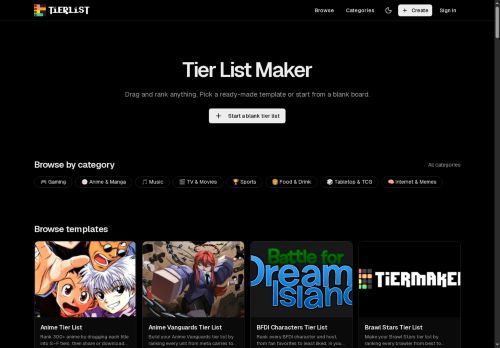
A drag-and-drop interface lets users upload images, reorder items, and adjust item placement within tiers.Custom tier labels and row color options support category-specific grading like meta tiers, character strengths, or personal preferences.
Finished tier lists can be exported as high-resolution PNGs and shared via instant shareable links for social media, Discord, or forums.The mobile-friendly editor and desktop support accommodate on-the-go edits and larger projects.
Suitable for gamers building meta tier lists, fans ranking characters or media, content creators producing visuals, and communities organizing debates.
Key Features
- Web-based tier list creator for ranking items across topics
- Ready-made templates and a blank board option for custom rankings
- Drag-and-drop interface with image upload, item reordering, and placement adjustment
- Custom tier labels and row color customization
- Export to high-resolution PNG and generate instant shareable links
Use Cases
- Create interactive tier lists for gaming communities with Tier List Maker — rank characters, items or strategies using 200+ templates, drag-and-drop image uploads and custom tier labels/colors, then export high-resolution PNGs and shareable links for social media polls
- Visualize product feature prioritization and competitive comparisons for marketing or roadmap planning using ready-made templates and mobile-friendly editing, color-code importance with customizable tiers and produce clean high-res PNG exports for presentations and reports
- Run classroom activities, workshops or team retrospectives to prioritize ideas and decisions with an easy drag-and-drop board, tailor tier labels to your criteria, share boards via links to gather input, and deliver polished visuals as high-resolution PNGs for documentation
Who is it for?
- Gamers
- Content creators
- Community moderators
- Fans
- Casual list makers
Based on 7 verified user reviews — Average rating: 3.86/5

@nicolemoore9606
TurkeyWhat surprised me about Tierlist AI is how little friction there is once you set preferences. I keep a short checklist: audience, tone, must-include points, and forbidden phrases. With that, outputs are consistently usable. Without it, results feel generic. I also like that I can iterate quickly instead of restarting from a blank page. Missing features for me: better version history and clearer export options. Even so, it has replaced a couple of scattered tools in my stack. Rating reflects practical value in my week, not hype from the landing page.

@arperaughn4208
TurkeyHafif işler için idare eder. Muhteşem değil ama basit işleri çıkarıyor.

@joanbrooks893
TurkeyTierlist AI ile ilgili sürpriz, tercihleri ayarladıktan sonra sürtünmenin azalması oldu. Kısa bir kontrol listem var: hedef kitle, ton, zorunlu maddeler, istenmeyen ifadeler. Bunlarla çıktılar düzenli şekilde kullanılabilir oluyor. Olmadan sonuçlar genel kalıyor. Boş sayfadan başlamak yerine hızlıca iterasyon yapabilmek de büyük artı. Eksik gördüğüm yerler: daha iyi sürüm geçmişi ve net export seçenekleri. Yine de dağınık birkaç aracı elimden aldı. Puanım reklam değil, haftalık pratik faydaya göre.


@jeffreyanderson2963
TurkeySade, odaklı ve şişirilmemiş. Bu bile birçok AI aracından ayırıyor.

@laurenbailey5086
TurkeyHızlı denemeler için tam istediğim şey. Freelancer ve küçük ekiplere öneririm.
More Gaming AI Tools
Explore other gaming tools with user ratings, pricing details, and in-depth descriptions. Updated regularly by our editorial team.