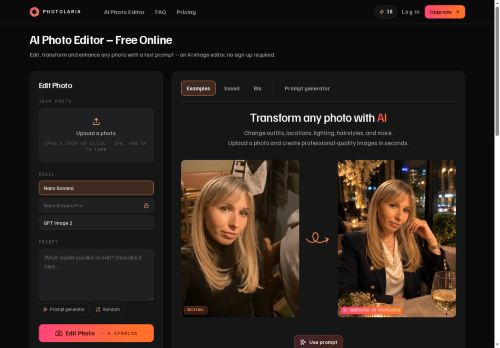
About Photolaria
Core tools include background and model removal, preset styles, and targeted portrait and lifestyle adjustments.The private gallery stores generations by default and provides a bin with 30-day restore and permanent deletion options.
Guest sessions are available for temporary use, and profile controls let users delete individual photos or entire histories.Image export and re-editing are supported, while generation limits and account management are handled in the app; review the terms for usage and commercial-rights details.
Key Features
- Drag-and-drop upload for JPG and PNG files (up to 10 MB)
- Prompt-based editing with built-in prompt generator for outfits, backgrounds, lighting, hairstyles, and stylistic looks
- Core editing tools: background removal, model removal, preset styles, and targeted portrait and lifestyle adjustments
- Private gallery with default storage, bin with 30-day restore, and permanent deletion; profile controls for deleting individual photos or entire histories
- Image export and re-editing; guest sessions; in-app generation limits and account management
Use Cases
- Create high-converting ecommerce product photos with Photolaria by drag-and-drop uploads, remove or replace backgrounds, apply lighting and retouching presets and use the prompt generator for outfit/background tweaks to produce consistent, ready-to-export images without Photoshop or advanced editing skills
- Iterate marketing and campaign visuals quickly using prompt-driven edits and the built-in prompt generator to swap outfits, hairstyles and backgrounds across model shots, maintain brand-consistent styles with presets and store versioned assets in a private gallery for stakeholder review
- Deliver polished portrait retouching and social media content for clients by combining portrait presets, background/model removal and prompt-based style suggestions, then export optimized files and share drafts securely through the private gallery
Who is it for?
- Graphic designers
- Fashion designers
- Portrait photographers
- Product designers
- E-commerce sellers
Based on 5 verified user reviews — Average rating: 4.00/5

@walterwright8912
TurkeyReally useful for my workflow. Setup was quick and the results were better than I expected.

@stephaniegonzalez236
TurkeyPhotolaria ile ilgili sürpriz, tercihleri ayarladıktan sonra sürtünmenin azalması oldu. Kısa bir kontrol listem var: hedef kitle, ton, zorunlu maddeler, istenmeyen ifadeler. Bunlarla çıktılar düzenli şekilde kullanılabilir oluyor. Olmadan sonuçlar genel kalıyor. Boş sayfadan başlamak yerine hızlıca iterasyon yapabilmek de büyük artı. Eksik gördüğüm yerler: daha iyi sürüm geçmişi ve net export seçenekleri. Yine de dağınık birkaç aracı elimden aldı. Puanım reklam değil, haftalık pratik faydaya göre.

@alebtone3527
TurkeyPhotolaria araçını düzenli kullanıyorum. Brief netse zaman kazandırıyor.


@donnamartin2308
TurkeyArayüzü temiz, çıktı kalitesi iyi. Günlük işlerimde sık kullanıyorum.

@olerake1210
NetherlandsThree stars. Works, just nothing special compared with alternatives.
More Photo editing AI Tools
Explore other photo editing tools with user ratings, pricing details, and in-depth descriptions. Updated regularly by our editorial team.