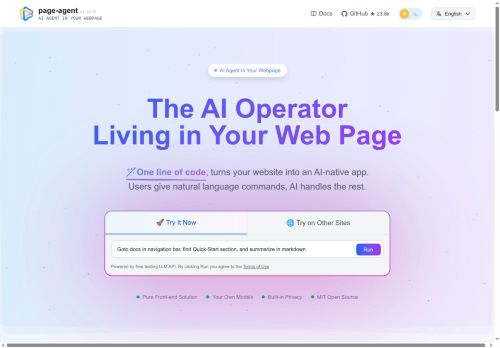

About Page-agent
Optional Chrome extension and multi-page agent features support cross-tab tasks and larger automation flows, while an MCP server option enables external clients to control browsers.Common use cases include building SaaS AI copilots, automating complex ERP/CRM workflows, smart form filling, and improving web accessibility through voice and screen-reader interactions.
Documentation and examples cover installation, model configuration, and programmatic execution for application developers, QA engineers, and accessibility teams.
Key Features
- In-page JavaScript GUI agent for natural-language control of web interfaces and browser automation
- Text-based DOM manipulation (e.g., click buttons, fill forms)
- Screenshot capture
- Multi-modal LLM integration to interpret and execute commands
- Multiple integration and deployment options: single script tag or npm package, programmatic API for in-browser, headless, Python/extension workflows; optional Chrome extension/multi-page agents and MCP server for cross-tab and external control
Use Cases
- Automate end-to-end web testing and UI regression with page-agent by giving plain-English instructions to click elements, fill forms, follow cross-tab flows, take screenshots, and produce annotated reports—running in-browser or headless and using LLMs to generate and refine test cases
- Create voice-enabled, accessible web workflows for users with disabilities by embedding the in-page agent to enable natural-language or voice commands for smart form filling, dynamic DOM updates, cross-tab navigation, and real-time feedback without additional front-end changes
- Build lightweight browser-based data extraction and monitoring pipelines that use text-based DOM queries and LLM-driven parsing to scrape content, follow links across tabs, capture screenshots, and export structured data to extensions or external endpoints with error recovery and automation control
Who is it for?
- Application developers
- Frontend/web developers
- Saas product builders
- Qa engineers
- Automation engineers
Based on 8 verified user reviews — Average rating: 4.50/5

@walterbrooks4921
TurkeyPage-agent ile ilgili sürpriz, tercihleri ayarladıktan sonra sürtünmenin azalması oldu. Kısa bir kontrol listem var: hedef kitle, ton, zorunlu maddeler, istenmeyen ifadeler. Bunlarla çıktılar düzenli şekilde kullanılabilir oluyor. Olmadan sonuçlar genel kalıyor. Boş sayfadan başlamak yerine hızlıca iterasyon yapabilmek de büyük artı. Eksik gördüğüm yerler: daha iyi sürüm geçmişi ve net export seçenekleri. Yine de dağınık birkaç aracı elimden aldı. Puanım reklam değil, haftalık pratik faydaya göre.

@katherinemorgan3010
TurkeyGüzel bir keşif. Dokümantasyon biraz daha net olabilirdi ama öğrenince verimli.

@lauragreen5392
TurkeyHelpful assistant for repetitive work. Still needs human review on important outputs.


@austinsmith4986
TurkeyWhat surprised me about Page-agent is how little friction there is once you set preferences. I keep a short checklist: audience, tone, must-include points, and forbidden phrases. With that, outputs are consistently usable. Without it, results feel generic. I also like that I can iterate quickly instead of restarting from a blank page. Missing features for me: better version history and clearer export options. Even so, it has replaced a couple of scattered tools in my stack. Rating reflects practical value in my week, not hype from the landing page.

@bryancastillo1750
TurkeyWhat surprised me about Page-agent is how little friction there is once you set preferences. I keep a short checklist: audience, tone, must-include points, and forbidden phrases. With that, outputs are consistently usable. Without it, results feel generic. I also like that I can iterate quickly instead of restarting from a blank page. Missing features for me: better version history and clearer export options. Even so, it has replaced a couple of scattered tools in my stack. Rating reflects practical value in my week, not hype from the landing page.
More Developer tools AI Tools
Explore other developer tools tools with user ratings, pricing details, and in-depth descriptions. Updated regularly by our editorial team.