
About Cli-Anything
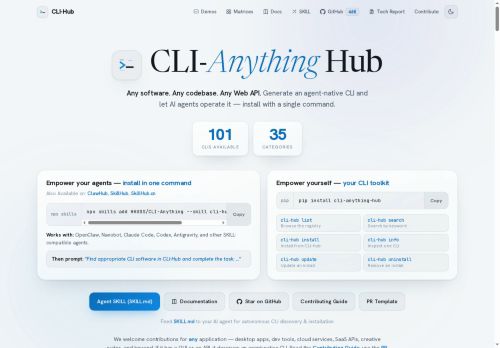
Users can browse, search, list, inspect, install, update, and uninstall CLIs via a unified interface (cli-hub list / search / install / info / update / uninstall).Agent developers can add agent-native skills with a single command workflow (e.
g., cli-hub install then npx skills add.), enabling autonomous agents to execute real-world tasks.The hub provides a CLI toolkit (pip install cli-anything-hub) and integration examples for agent frameworks (OpenClaw, Nanobot, Claude, Codex, Antigravity, skill-compatible agents).
Maintainers and contributors can publish skills and CLIs via GitHub using a standard skill.md and PR template to extend the registry.The registry targets developers, automation engineers, AI integrators, and platform teams that need centralized discovery, rapid installation, and repeatable agent-native CLI workflows.
Key Features
- Agent-friendly registry and marketplace for agent-native CLIs and skills
- Indexed catalog of dozens of CLIs across 31+ categories for agent discovery and invocation
- Unified CLI interface for managing CLIs (list/search/install/info/update/uninstall)
- Single-command workflow to add agent-native skills (e.g., cli-hub install <cli> then npx skills add ...)
- Installable CLI toolkit (pip install cli-anything-hub) with integration examples for multiple agent frameworks
Use Cases
- Discover, inspect, and install agent-native CLIs from cli-anything hub directly in your terminal to rapidly add capabilities to your agents without leaving your development workflow
- Compose repeatable multi-step agent workflows by combining installable skills from the marketplace and integrating them with popular agent frameworks, enabling reliable automation and easy sharing across teams
- Audit, version, and manage agent skills with the unified CLI to ensure secure, reproducible deployments—browse categories, run local inspections, and automate updates and rollbacks in CI/CD pipelines
Who is it for?
- Developers
- Agent developers
- Platform teams
- Automation engineers
- Devops engineers
Based on 7 verified user reviews — Average rating: 4.14/5

@kellythomas7003
TurkeyDetailed take after daily use: Cli-Anything is strongest on speed and decent on quality when the brief is clear. I tested it against two alternatives on the same tasks (blog outline, meeting notes cleanup, and a short product FAQ). Cli-Anything was the fastest and produced the least awkward tone. Weak points are edge cases — niche jargon and multi-step instructions sometimes drift. I solved that with a saved prompt style guide. Pricing is okay if you actually use it several times a week; otherwise the free tier may be enough. Overall I would recommend it to freelancers and small teams who need reliable first drafts, not final publish-ready copy every time.

@jessealvarez296
TurkeySade, odaklı ve şişirilmemiş. Bu bile birçok AI aracından ayırıyor.
More Developer tools AI Tools
Explore other developer tools tools with user ratings, pricing details, and in-depth descriptions. Updated regularly by our editorial team.