
About Browse.sh
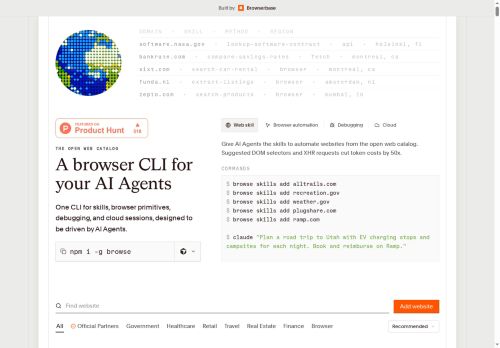
It exposes a searchable open-web catalog of site-specific skills and structured read-only APIs (AllTrails, Recreation.gov, Weather.gov, PlugShare, Ramp, Ticketmaster, FlightAware, Glassdoor, NASA APOD, Amazon, Airbnb, Craigslist, Archive.
org) for extraction and integration.Features include local and remote Chromium sessions via Browserbase, cloud fetch and search APIs, and session-level debugging with network and console tailing for real-time inspection.
Suggested DOM selectors and XHR usage reduce token and processing costs, aiding efficient agent design and data extraction.Use cases include AI agent developers, automation engineers, QA/debugging workflows, data analysts, and tooling for web scraping, booking and listing search, flight tracking, and content retrieval.
Outputs support structured JSON, SSR/GraphQL extraction, and element-addressable selectors to simplify integration into pipelines and agent-driven automation.
Key Features
- CLI browser automation with primitives (click, scroll, type, hover, press) and accessibility-aware selectors
- Searchable open-web catalog of site-specific skills and structured read-only APIs (AllTrails, Recreation.gov, Weather.gov, PlugShare, Ramp, Ticketmaster, FlightAware, Glassdoor, NASA APOD, Amazon, Airbnb, Craigslist, Archive.org)
- Local and remote Chromium sessions via Browserbase
- Cloud fetch and search APIs
- Session-level debugging with network and console tailing for real-time inspection
Use Cases
- Automate recurring, reliable extraction of structured product, pricing, and catalog data across multiple websites using browse.sh's CLI browser automation and accessibility-aware selectors, producing clean read-only APIs optimized for agent-driven extraction and backend integration
- Build and maintain site-specific interaction skills for customer support and agent workflows by recording clicks, form entries, and hovers in browse.sh's searchable skill catalog, using session-level debugging to reproduce and harden flows for accessible, repeatable automations
- Run accessibility-aware end-to-end testing and live monitoring of web apps by scripting interactions (click, scroll, type, press) with browse.sh, leveraging session debugging to reproduce defects and outputting structured reports that feed directly into CI pipelines and developer workflows
Who is it for?
- Automation engineers
- Web scraping engineers
- Integration engineers
- Site-specific skill developers
- Product engineers
Based on 7 verified user reviews — Average rating: 3.71/5

@christopherreyes6897
TurkeyI compared a few alternatives and this one felt more practical for everyday use.

@jamesturner8275
TurkeyThe output quality improved after I wrote better prompts. Highly usable.

@katherinewright8651
TurkeyHızlı denemeler için tam istediğim şey. Freelancer ve küçük ekiplere öneririm.


@gloriagutierrez6159
TurkeyBeyin fırtınası ve ilk taslaklar için harika. Bu ay birkaç saatimi kurtardı.

@dylanlong9964
TurkeyI have been using Browse.sh for a few weeks on real client work, not just demos. The first week was mostly learning prompts and figuring out which templates stick. After that, drafting time dropped noticeably — especially for outlines, email replies, and first-pass summaries. It is not flawless: long documents sometimes lose structure, and I still fact-check anything important. Still, for a busy week it has become one of the tools I open without thinking. If you already have a clear workflow, Browse.sh fits in cleanly. If you expect magic with zero editing, you will be disappointed. For me, the time saved on the boring middle steps is worth it.
More Developer tools AI Tools
Explore other developer tools tools with user ratings, pricing details, and in-depth descriptions. Updated regularly by our editorial team.