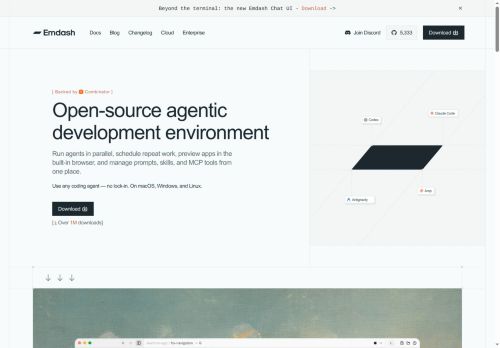

About Emdash.sh
Built-in file editor, diff view, and commit/push workflows let developers review edits and ship changes without switching tools.Integrations include automatic CLI detection for agent CLIs, connectors for Linear, Jira, and GitHub, and options to route tasks to specific personnel or terminals.
Workspace features include Kanban and status views for running agents, task-level progress tracking, and configurable agent options and terminals.Supports mixing agents and models (Codex, Gemini, Claude, Qwen, etc.
), multi-provider execution, and isolated worktree orchestration for reproducible agent runs.
Key Features
- Orchestrates coding agents across isolated git worktrees for reproducible agent runs
- Runs multiple parallel agents and compares results across providers or model copies (best-N experimentation)
- Built-in file editor, diff view, and commit/push workflows for reviewing edits and shipping changes
- Integrations with automatic CLI detection and connectors for Linear, Jira, and GitHub, plus routing tasks to specific personnel or terminals
- Supports mixing agents and models (Codex, Gemini, Claude, Qwen, etc.) and multi-provider execution
Use Cases
- Coordinate multiple code-generation agents to implement a new feature across isolated git worktrees using emdash to orchestrate parallel agents, compare outputs from multiple models/providers side-by-side, review diffs in the built-in editor, and commit/push the chosen changes to GitHub while automatically creating or updating Linear or Jira tasks
- Automate large-scale refactors by routing targeted refactoring tasks to specialized agents, using emdash’s multi-model comparison to evaluate suggestions, selecting the safest diff, applying commits across worktrees, and opening linked PRs and issue updates for team review
- Prototype and evaluate alternative implementation approaches by spinning up parallel agents with different models/providers, use emdash’s diff and comparison workflows to pick the best solution, push the final code and maintain traceable task routing and tracking in Linear, Jira, or GitHub
Who is it for?
- Software engineers
- Engineering teams
- Developer platform engineers
- Mlops engineers
- Open-source maintainers
Based on 9 verified user reviews — Average rating: 4.11/5

@pauladams1188
TurkeyWhat surprised me about Emdash.sh is how little friction there is once you set preferences. I keep a short checklist: audience, tone, must-include points, and forbidden phrases. With that, outputs are consistently usable. Without it, results feel generic. I also like that I can iterate quickly instead of restarting from a blank page. Missing features for me: better version history and clearer export options. Even so, it has replaced a couple of scattered tools in my stack. Rating reflects practical value in my week, not hype from the landing page.

@brucelee5574
TurkeyMixed first impression, then it clicked. Now it is part of my weekly stack.
@stevenho
TurkeyDoes what it promises. Not perfect, but definitely worth trying if you need this category of AI help.


@justinlee7589
TurkeyEmdash.sh ile taslak ve özet çıkarıyorum. Karmaşık hissettirmeden sürtünmeyi azaltıyor.
@dpzjay
TurkeyEmdash.sh helped me move faster on routine tasks. Happy with the results so far.
More Developer tools AI Tools
Explore other developer tools tools with user ratings, pricing details, and in-depth descriptions. Updated regularly by our editorial team.