
About Minimax-h3.io
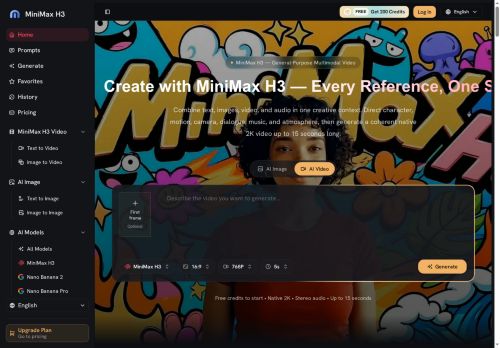
minimax h3 is an AI video generator for creating native 2K, 24 fps, 15-second multi-shot videos with integrated stereo audio.It accepts multimodal inputs—text, images, reference clips and audio—so users can combine prompts, stills and footage into one production brief.
The tool exposes director-level controls for character movement, camera language, shot order, lighting, dialogue and sound to preserve visual identity and fine on-screen detail.Features include image-to-video and text-to-video generation, motion transfer from reference clips, and synchronized audio generation (dialogue, music, effects).
Natural-language edit commands let teams relight, restage or rewrite existing clips while keeping selected elements.Target users include content creators, advertisers, e-commerce and product teams, game developers and UI/motion designers seeking production-ready, reviewable video outputs and centralized asset management.
Key Features
Use Cases
Who is it for?
The tool exposes director-level controls for character movement, camera language, shot order, lighting, dialogue and sound to preserve visual identity and fine on-screen detail.Features include image-to-video and text-to-video generation, motion transfer from reference clips, and synchronized audio generation (dialogue, music, effects).
Natural-language edit commands let teams relight, restage or rewrite existing clips while keeping selected elements.Target users include content creators, advertisers, e-commerce and product teams, game developers and UI/motion designers seeking production-ready, reviewable video outputs and centralized asset management.
Key Features
- Native 2K, 24 fps, 15-second multi-shot video generation
- Multimodal input support: text, images, reference clips, audio
- Director-level controls for character movement, camera language, shot order, lighting, dialogue and sound
- Image-to-video and text-to-video generation with motion transfer from reference clips
- Integrated stereo audio and synchronized audio generation (dialogue, music, effects); natural-language edit commands to relight, restage or rewrite clips
Use Cases
- Create high-impact 15-second product promo videos for social media and ads by feeding minimax h3 text, product images or short clips to generate native 2K, 24fps multi-shot videos with motion-transferred product demos, synchronized stereo audio, and director-level controls—then iterate quickly via natural-language edits for A/B testing
- Turn storyboards or script snippets into cinematic teasers and dailies: convert text and reference images/clips into multi-shot 2K, 24fps scenes, apply reference motion transfer for realistic actor or object movement, fine-tune framing/cuts with natural-language commands, and export ready-to-share clips with integrated audio
- Create personalized microlearning or marketing videos using existing assets and voice clips—generate 15-second, multi-shot videos that sync narration and sound, animate static brand avatars or imagery with motion transfer, and refine messaging or timing instantly through natural-language edits
Who is it for?
- Content creators
- Advertisers
- E-commerce teams
- Product teams
- Game developers
- Ui designers
- Motion designers
No review yet!
More Video AI Tools
Explore other video tools with user ratings, pricing details, and in-depth descriptions. Updated regularly by our editorial team.