
About Minimax-h3.io
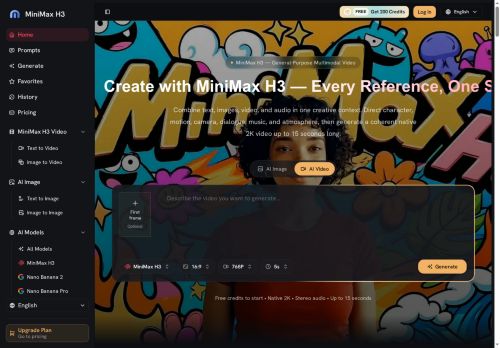
The tool exposes director-level controls for character movement, camera language, shot order, lighting, dialogue and sound to preserve visual identity and fine on-screen detail.Features include image-to-video and text-to-video generation, motion transfer from reference clips, and synchronized audio generation (dialogue, music, effects).
Natural-language edit commands let teams relight, restage or rewrite existing clips while keeping selected elements.Target users include content creators, advertisers, e-commerce and product teams, game developers and UI/motion designers seeking production-ready, reviewable video outputs and centralized asset management.
Key Features
- Native 2K, 24 fps, 15-second multi-shot video generation
- Multimodal input support: text, images, reference clips, audio
- Director-level controls for character movement, camera language, shot order, lighting, dialogue and sound
- Image-to-video and text-to-video generation with motion transfer from reference clips
- Integrated stereo audio and synchronized audio generation (dialogue, music, effects); natural-language edit commands to relight, restage or rewrite clips
Use Cases
- Create high-impact 15-second product promo videos for social media and ads by feeding minimax h3 text, product images or short clips to generate native 2K, 24fps multi-shot videos with motion-transferred product demos, synchronized stereo audio, and director-level controls—then iterate quickly via natural-language edits for A/B testing
- Turn storyboards or script snippets into cinematic teasers and dailies: convert text and reference images/clips into multi-shot 2K, 24fps scenes, apply reference motion transfer for realistic actor or object movement, fine-tune framing/cuts with natural-language commands, and export ready-to-share clips with integrated audio
- Create personalized microlearning or marketing videos using existing assets and voice clips—generate 15-second, multi-shot videos that sync narration and sound, animate static brand avatars or imagery with motion transfer, and refine messaging or timing instantly through natural-language edits
Who is it for?
- Content creators
- Advertisers
- E-commerce teams
- Product teams
- Game developers
- Ui designers
- Motion designers
Based on 8 verified user reviews — Average rating: 4.38/5

@jackbennett8604
TurkeyThe output quality improved after I wrote better prompts. Highly usable.

@nicholasstewart5379
TurkeyWhat surprised me about Minimax-h3.io is how little friction there is once you set preferences. I keep a short checklist: audience, tone, must-include points, and forbidden phrases. With that, outputs are consistently usable. Without it, results feel generic. I also like that I can iterate quickly instead of restarting from a blank page. Missing features for me: better version history and clearer export options. Even so, it has replaced a couple of scattered tools in my stack. Rating reflects practical value in my week, not hype from the landing page.

@christinerogers5948
TurkeyMinimax-h3.io araçını birkaç haftadır gerçek işlerde deniyorum; sadece demo değil. İlk hafta prompt alışkanlığı kazanmakla geçti. Sonrasında özellikle taslak, e-posta yanıtı ve özet işlerinde süre belirgin düştü. Kusursuz değil: uzun metinlerde yapı bozulabiliyor ve kritik noktaları mutlaka kontrol ediyorum. Yine de yoğun bir haftada düşünmeden açtığım araçlardan biri oldu. Net bir iş akışınız varsa Minimax-h3.io kolay oturuyor. Sıfır düzenlemeyle sihir bekliyorsanız hayal kırıklığı olur. Benim için sıkıcı ara adımları kısaltması yeterli sebep.


@gabrielrodriguez7751
TurkeyMenü kalabalığı yok, özellikler işe yarıyor. Pratik bir AI katkısı.

@matthewgonzalez2956
TurkeyI have been using Minimax-h3.io for a few weeks on real client work, not just demos. The first week was mostly learning prompts and figuring out which templates stick. After that, drafting time dropped noticeably — especially for outlines, email replies, and first-pass summaries. It is not flawless: long documents sometimes lose structure, and I still fact-check anything important. Still, for a busy week it has become one of the tools I open without thinking. If you already have a clear workflow, Minimax-h3.io fits in cleanly. If you expect magic with zero editing, you will be disappointed. For me, the time saved on the boring middle steps is worth it.
More Video AI Tools
Explore other video tools with user ratings, pricing details, and in-depth descriptions. Updated regularly by our editorial team.