
About Muse Video
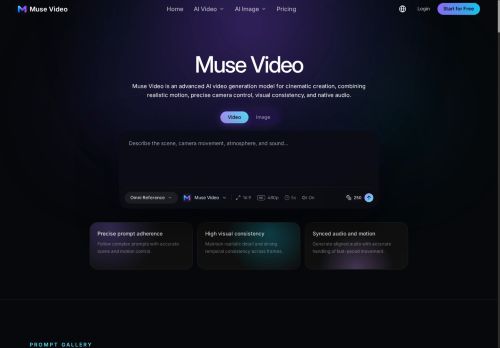
Muse Video generates videos from detailed text prompts and reference images, producing motion sequences with native audio support.
The model emphasizes prompt adherence, visual fidelity, and temporal consistency to keep subjects and scenes coherent across frames.
Prompt-driven controls let users specify actions, camera movement, pacing, lighting, ambience, dialogue, and sound effects.
Image-to-video workflows preserve composition and reference details while introducing realistic motion and camera direction.
Workspace features include flexible generation settings, model selection for different styles, and a reusable creation library for prompts and assets.
Native audio generation is included, with ongoing improvements to audio-video synchronization and fast-motion handling.
Key Features
Use Cases
Who is it for?
The model emphasizes prompt adherence, visual fidelity, and temporal consistency to keep subjects and scenes coherent across frames.
Prompt-driven controls let users specify actions, camera movement, pacing, lighting, ambience, dialogue, and sound effects.
Image-to-video workflows preserve composition and reference details while introducing realistic motion and camera direction.
Workspace features include flexible generation settings, model selection for different styles, and a reusable creation library for prompts and assets.
Native audio generation is included, with ongoing improvements to audio-video synchronization and fast-motion handling.
Key Features
- Text- and image-driven video generation producing motion sequences
- Native audio generation and audio-video synchronization
- Temporal consistency and visual fidelity to maintain coherent subjects and scenes across frames
- Prompt-driven controls for actions, camera movement, pacing, lighting, ambience, dialogue, and sound effects
- Workspace with flexible generation settings, model/style selection, and a reusable prompt and asset library
Use Cases
- Produce high-converting product demo and social ad videos from detailed prompts and reference images, controlling camera motion, lighting, pacing and native audio generation so you can create polished marketing assets without any filming or manual editing
- Create story-driven short films, game cinematics or trailers by converting scripts and concept art into temporally coherent motion sequences with precise camera, action and sound design controls, iterating quickly and maintaining consistent visual style using a reusable prompt library
- Develop engaging e-learning modules and software tutorials by turning lesson scripts and screenshots into step-by-step motion sequences with synchronized voiceover, clear pacing and on-screen action highlights, enabling rapid localization and versioning through prompt-driven workflows
Who is it for?
- Content creators
- Social media influencers
- Filmmakers and directors
- Animators and animation studios
- Vfx artists
- Motion designers
- Advertising and marketing agencies
- Game developers
- Product and ux designers
- Educators and instructional designers
- Video editors and post-production teams
- Storyboard artists and previsualization teams
- Corporate training and e-learning teams
- Indie creators and hobbyists
No review yet!
More Video AI Tools
Explore other video tools with user ratings, pricing details, and in-depth descriptions. Updated regularly by our editorial team.