
About Flow AI
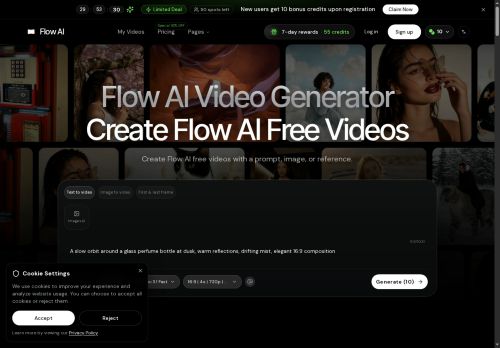
Flow AI Video Generator converts text, images, or reference clips into short video drafts, using guided first-and-last-frame inputs and scene prompts to plan reveals and transitions.
It supports image-to-video continuity and text-to-video exploration, enabling rapid generation of multiple variations for comparison and review. The tool renders camera moves, pacing, and atmosphere from written direction and keeps visual references alongside prompts to preserve anchors.
Features include frame-based planning, automated variation creation, and exportable drafts for downstream editing and approval. Outputs are suited for previsualization, testing hooks and camera approaches, and iterating creative directions before full production.
Key Features
Use Cases
Who is it for?
It supports image-to-video continuity and text-to-video exploration, enabling rapid generation of multiple variations for comparison and review. The tool renders camera moves, pacing, and atmosphere from written direction and keeps visual references alongside prompts to preserve anchors.
Features include frame-based planning, automated variation creation, and exportable drafts for downstream editing and approval. Outputs are suited for previsualization, testing hooks and camera approaches, and iterating creative directions before full production.
Key Features
- Converts text, images, and reference clips into short video drafts
- Frame-based planning using guided first-and-last-frame inputs and scene prompts to plan reveals and transitions
- Supports image-to-video continuity and preserves visual reference anchors alongside prompts
- Renders camera moves, pacing, and atmosphere from written direction
- Automated creation of multiple variations with exportable drafts for downstream editing
Use Cases
- Previsualize film or commercial scenes by turning script lines and reference images into short video drafts using guided first/last-frame anchors and scene prompts, preserving visual continuity while automatically adding camera moves, pacing and multiple shot variations for director review and rapid iteration
- Produce social media ads and marketing clips from product photos or text briefs using text-to-video and image-to-video continuity, generate exportable drafts with different pacing, camera angles and atmosphere for A/B testing, then hand off selected variations to editors or publish directly
- Plan and communicate UX flows, onboarding sequences or product demos by converting interface screenshots and storyboard frames into frame-based shot plans and animated continuity, rendering smooth camera moves and automated variations to get stakeholder sign-off and streamline handoff to motion designers
Who is it for?
- Film directors
- Cinematographers/directors of photography
- Storyboard artists
- Previsualization artists
- Video editors
- Creative directors
- Advertising agencies
- Marketing teams and brand managers
- Social media and short-form content creators
- Producers
- Vfx supervisors
- Animators
- Motion designers
- Independent filmmakers
No review yet!
More Video AI Tools
Explore other video tools with user ratings, pricing details, and in-depth descriptions. Updated regularly by our editorial team.