
About EverygenAI.org
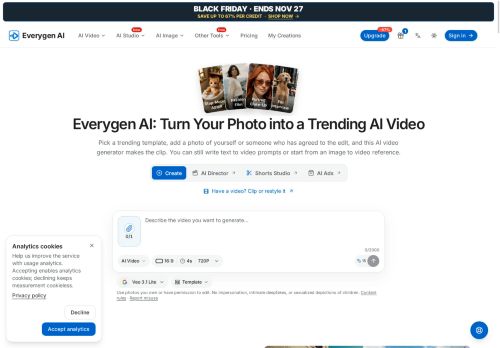
EverygenAI.org — AI Video Generator turns a single photo into short videos using template-driven image-to-video transformations.
Choose from a library of trending templates or build custom scenes with text-to-video and image-to-video controls.
Templates preset motion, camera moves, and timing so you can generate clips without writing detailed prompts; advanced controls let you adjust scene parameters and select models.
The generator shows a credit estimate before each run, saves your generation history, and provides preview and download of completed clips.
Available models produce photoreal, stylized, and stop-motion looks with a range of camera behaviors and motion effects.
Upload only images you own or have permission to edit and follow the platform’s content and consent guidelines.
Key Features
Use Cases
Who is it for?
Choose from a library of trending templates or build custom scenes with text-to-video and image-to-video controls.
Templates preset motion, camera moves, and timing so you can generate clips without writing detailed prompts; advanced controls let you adjust scene parameters and select models.
The generator shows a credit estimate before each run, saves your generation history, and provides preview and download of completed clips.
Available models produce photoreal, stylized, and stop-motion looks with a range of camera behaviors and motion effects.
Upload only images you own or have permission to edit and follow the platform’s content and consent guidelines.
Key Features
- Converts a single photo into short videos using template-driven image-to-video transformations
- Library of trending templates and ability to build custom scenes with text-to-video and image-to-video controls
- Templates preset motion, camera moves, and timing while advanced controls adjust scene parameters and select models
- Displays credit cost estimates before each generation run
- Saves generation history and provides preview and download of completed clips
Use Cases
- Create attention-grabbing social media and ad videos from a single product photo using Everygen AI's template-driven image-to-video and text-to-video generators — pick photoreal or stylized models, customize camera moves and scene parameters, preview variations, and download ready-to-publish clips
- Turn a historical or family photo into a short, emotive animated clip with Everygen AI's single-photo animation tools — choose photoreal, stylized, or stop-motion models, add subtle camera moves and text prompts, preview edits and keep version history for sharing or archival projects
- Produce quick explainer or product listing videos by converting one image plus a short script into staged visual scenes using Everygen AI templates — tweak scene timing, camera motion, and aesthetic model, iterate with previews, and export optimized videos for e-learning or e-commerce
Who is it for?
- Social media creators and influencers
- Digital marketers and advertisers
- Small business owners and e-commerce sellers
- Photographers and visual artists
- Video editors and motion designers
- Creative agencies and content studios
- Non-technical creators and hobbyists
No review yet!
More Video AI Tools
Explore other video tools with user ratings, pricing details, and in-depth descriptions. Updated regularly by our editorial team.