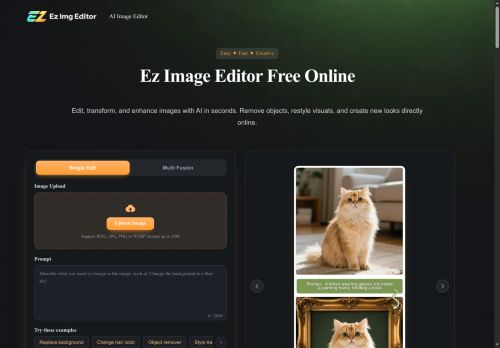

About EzImgEditor
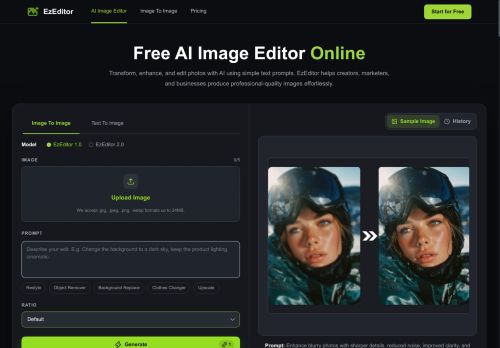
Supports single-image edits and multi-image blending with text-prompt controls and common aspect ratios.Accepts JPEG, JPG, PNG and WebP formats and provides selective adjustments for color, lighting, and facial detail.
Use cases include e-commerce product shots, real estate and interior design mockups, social media content and influencer feeds, and LinkedIn/resume headshots.Tools aim to speed image workflows, create consistent product or profile visuals, and combine multiple photos into custom compositions without desktop software.
Key Features
- Object removal
- Background replacement
- Hair and color changes
- Style transfer
- Old-photo restoration
Use Cases
- Prepare polished product photos for your online store by removing unwanted objects, replacing backgrounds with consistent studio or lifestyle scenes, and using selective color and lighting adjustments plus multi-image blending to create cohesive brand-ready images
- Restore and enhance old family photos by removing scratches and stains, performing facial and color restoration, applying style transfer to modernize tones, and blending multiple scans to reconstruct damaged areas for high-quality prints
- Create attention-grabbing social and marketing visuals by swapping backgrounds, changing hair or clothing color with text-prompt controls, removing distractions, applying stylistic filters, and exporting in common aspect ratios optimized for ads and social platforms
Who is it for?
- Graphic designers
- Interior designers
- Product photographers
- Content creators
- Social media managers
Based on 9 verified user reviews — Average rating: 3.67/5

@bettykelly3669
TurkeySimple, focused, and not bloated. That alone makes it stand out among AI tools.

@royortiz1200
TurkeyDaha iyi prompt yazınca çıktı kalitesi net yükseldi. Kullanışlı buldum.
@judithevans5697
TurkeyI have been using EzImgEditor for a few weeks on real client work, not just demos. The first week was mostly learning prompts and figuring out which templates stick. After that, drafting time dropped noticeably — especially for outlines, email replies, and first-pass summaries. It is not flawless: long documents sometimes lose structure, and I still fact-check anything important. Still, for a busy week it has become one of the tools I open without thinking. If you already have a clear workflow, EzImgEditor fits in cleanly. If you expect magic with zero editing, you will be disappointed. For me, the time saved on the boring middle steps is worth it.


@mariabailey223
TurkeyEzImgEditor ile taslak ve özet çıkarıyorum. Karmaşık hissettirmeden sürtünmeyi azaltıyor.

@eugenehughes3270
TurkeyBenim kullanım alanıma yeterince isabetli. Destek dönüşleri de makul sürede geldi.
More Photo editing AI Tools
Explore other photo editing tools with user ratings, pricing details, and in-depth descriptions. Updated regularly by our editorial team.