
About Maestro AI
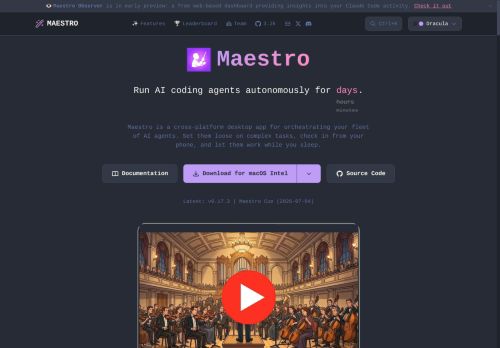
Built-in web server with QR and Cloudflare tunnel access for remote control; full CLI and headless modes for scripting, cron jobs, and pipeline integration.Real-time monitoring, agent workspace and history, session discovery, and group chat for multi-agent collaboration and stateful context.
Git integration with automatic repo detection, branch and diff views, commit logs, and git-aware file completion to streamline code edits.Keyboard-first UI with customizable shortcuts and command palette (Ctrl+K), plus JSON output and logging for integration with tools and automation workflows.
Key Features
- Orchestrates autonomous AI coding agents across desktop apps, headless CLI, and mobile remote control
- Supports multi-agent workflows, parallel agent instances, batch Markdown checklist processing, repeatable playbooks, and cron/CI/CD scheduling
- Built-in web server with QR code and Cloudflare Tunnel remote access plus full CLI and headless modes for scripting and pipeline integration
- Real-time monitoring and agent workspace with history, session discovery, and group chat for multi-agent collaboration and stateful context
- Git integration with automatic repository detection, branch and diff views, commit logs, and git-aware file completion
Use Cases
- Automate end-to-end feature development across microservices using Maestro's multi-agent orchestration and git-aware editing to assign autonomous agents to implement, run unit/integration tests, open and update pull requests, and stream JSON logs for auditability and CI/CD integration
- Set up continuous security, linting, and regression pipelines using Maestro by scheduling autonomous agents to scan branches, auto-fix trivial issues with git-aware edits, create PRs for human review, and export structured logs for compliance and observability
- Coordinate real-time incident remediation and hotfix delivery with Maestro's remote agent control and monitoring to triage failures, apply hotfix branches, run staged CI/CD deployments, and produce JSON/log outputs for postmortems and downstream automation
Who is it for?
- Software developers
- Devops engineers
- Automation engineers
- Engineering managers
- Quality assurance engineers
Based on 10 verified user reviews — Average rating: 3.90/5

@judyphillips7764
TurkeyHızından etkilendim. Gerçek bir projede denedim ve gayet iyi dayandı.

@alicediaz3006
TurkeyUsing Maestro AI for drafts and summaries. Cuts friction without feeling complicated.

@paulsmith566
TurkeyWhat surprised me about Maestro AI is how little friction there is once you set preferences. I keep a short checklist: audience, tone, must-include points, and forbidden phrases. With that, outputs are consistently usable. Without it, results feel generic. I also like that I can iterate quickly instead of restarting from a blank page. Missing features for me: better version history and clearer export options. Even so, it has replaced a couple of scattered tools in my stack. Rating reflects practical value in my week, not hype from the landing page.


@nathanbrown8650
TurkeyDetailed take after daily use: Maestro AI is strongest on speed and decent on quality when the brief is clear. I tested it against two alternatives on the same tasks (blog outline, meeting notes cleanup, and a short product FAQ). Maestro AI was the fastest and produced the least awkward tone. Weak points are edge cases — niche jargon and multi-step instructions sometimes drift. I solved that with a saved prompt style guide. Pricing is okay if you actually use it several times a week; otherwise the free tier may be enough. Overall I would recommend it to freelancers and small teams who need reliable first drafts, not final publish-ready copy every time.

@jacobrobinson1265
Turkeyİş akışıma gerçekten faydası oldu. Kurulumu kolaydı ve sonuçlar beklediğimden iyi çıktı.
More AI Agents AI Tools
Explore other ai agents tools with user ratings, pricing details, and in-depth descriptions. Updated regularly by our editorial team.