
About FreeMaker
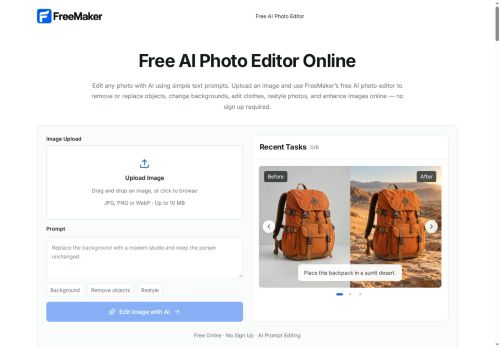
FreeMaker is an AI photo editor that applies text-prompt edits to images.
It performs object removal and replacement, background changes, clothing and style restyles, and text or logo edits using natural-language instructions.
The editor includes image enhancement and restoration tools to reduce blur, improve lighting, and extend compositions.
Edits are generated quickly in the browser and results are available for direct download.
Uploaded images are processed transiently and deleted automatically within 24 hours to limit retention.
The web-based tool runs in standard desktop and mobile browsers without installation.
Key Features
Use Cases
Who is it for?
It performs object removal and replacement, background changes, clothing and style restyles, and text or logo edits using natural-language instructions.
The editor includes image enhancement and restoration tools to reduce blur, improve lighting, and extend compositions.
Edits are generated quickly in the browser and results are available for direct download.
Uploaded images are processed transiently and deleted automatically within 24 hours to limit retention.
The web-based tool runs in standard desktop and mobile browsers without installation.
Key Features
- Natural-language (text-prompt) image editing interface
- Object removal and replacement
- Background changes and composition extension
- Clothing and style restyles and text/logo edits
- Browser-based editor running on desktop and mobile browsers without installation; transient processing with automatic deletion of uploads within 24 hours and direct download of results
Use Cases
- Create studio-quality product images for e-commerce using FreeMaker's in-browser text-prompt editor to remove or replace objects, swap backgrounds, restyle clothing and edit logos without Photoshop or coding, speeding up your listing workflow
- Restore and enhance family or archival photos with FreeMaker's online image restoration and enhancement tools—repair scratches, colorize, upscale and extend compositions via simple prompts while assets remain available for secure 24-hour download
- Produce on-brand marketing and social media visuals by swapping backgrounds, removing distractions, extending composition to multiple aspect ratios and iterating via text prompts directly in the browser to create platform-ready creatives quickly
Who is it for?
- Amateur photographers
- Professional photographers
- Social media influencers and content creators
- E-commerce sellers and product photographers
- Graphic designers and marketers
- Small business owners
- Real estate agents and home stagers
- Bloggers and writers
- Photo restoration enthusiasts
- Students and educators
No review yet!
More Image editing AI Tools
Explore other image editing tools with user ratings, pricing details, and in-depth descriptions. Updated regularly by our editorial team.