
About Gamelab studio
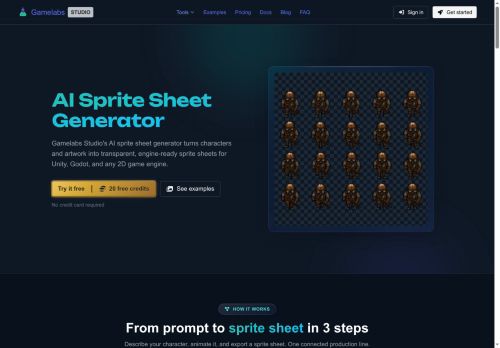
AI Sprite Sheet Generator. Generates transparent, engine-ready sprite sheets from text prompts or reference images. Supports multiple art styles and offers custom style training for consistent visual output. Converts static artwork into loopable, multi-angle animations while preserving semi-transparency across frames.
Accepts natural-language action descriptions (walk, attack, idle, jump, or custom motions) to produce coherent animation sequences. Provides configurable atlas layout, frame padding, and adjustable frame rate to match engine requirements.
Integrates generation, editing, animation, and export into one workflow and includes an API for batch processing and editor integration. Outputs are optimized to minimize chroma-key artifacts and deliver clean alpha channels ready for import into common 2D game engines.
Key Features
Use Cases
Who is it for?
Accepts natural-language action descriptions (walk, attack, idle, jump, or custom motions) to produce coherent animation sequences. Provides configurable atlas layout, frame padding, and adjustable frame rate to match engine requirements.
Integrates generation, editing, animation, and export into one workflow and includes an API for batch processing and editor integration. Outputs are optimized to minimize chroma-key artifacts and deliver clean alpha channels ready for import into common 2D game engines.
Key Features
- Generates transparent, engine-ready sprite sheets from text prompts or reference images
- Supports multiple art styles with custom style training for consistent visual output
- Converts static artwork into loopable, multi-angle animations while preserving semi-transparency across frames
- Accepts natural-language action descriptions to produce coherent animation sequences
- Configurable atlas layout, frame padding, and adjustable frame rate for engine requirements
Use Cases
- Generate engine-ready, transparent sprite sheets from a text prompt or reference image—complete with configurable atlas/frame settings and clean alpha output—so you can import loopable, multi-angle characters directly into Unity or Unreal without manual slicing or cleanup
- convert static 2D art into smooth, loopable multi-angle animations and train a custom style to match your game's aesthetic, then export batches via the API to automate asset pipelines and speed up iteration
- Produce large batches of NPCs, props and animation variants using custom style training and batch sprite-sheet export, optimizing atlas packing and frame order for runtime performance and easy editor integration
Who is it for?
- Indie game developers
- 2d game artists
- Pixel artists
- Freelance game artists
- Game studios and art teams
- Technical artists
- Game designers and prototypers
- Tools and engine integrators
- Animation artists
- Asset pipeline engineers
- Modders and hobbyists
- Game development educators and students
No review yet!
More Image editing AI Tools
Explore other image editing tools with user ratings, pricing details, and in-depth descriptions. Updated regularly by our editorial team.