
About Fotoreto
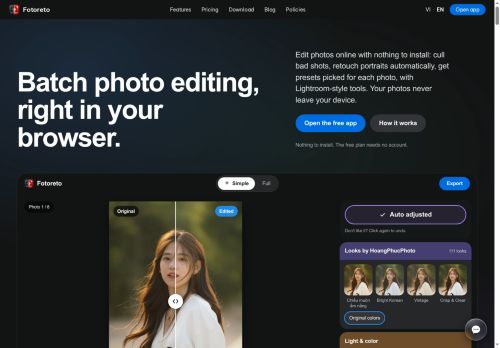
Fotoreto is a browser-based batch photo editor and portrait retouch tool that runs without installation and keeps edits local to the device.
It provides automatic culling that flags duplicates, blur, missed focus, exposure issues and closed eyes to speed review.
Automatic portrait retouch finds blemishes for review, applies detail-preserving skin smoothing and face brightening, and includes face/body shaping and hair fill options.
Smart presets analyze each frame, rank matching styles, and allow style amount control while protecting skin tones.
Edits can be synced across a whole shoot while preserving per-frame exposure and color balance.
Lightroom-style controls include tone curve, HSL, color grading, masks, local brushes, dodge & burn, object removal and background replacement.
In-browser 16-bit RAW editing, LUT/Lightroom preset import and offline operation make it suitable for fast, local batch workflows on desktop and mobile.
Key Features
Use Cases
Who is it for?
It provides automatic culling that flags duplicates, blur, missed focus, exposure issues and closed eyes to speed review.
Automatic portrait retouch finds blemishes for review, applies detail-preserving skin smoothing and face brightening, and includes face/body shaping and hair fill options.
Smart presets analyze each frame, rank matching styles, and allow style amount control while protecting skin tones.
Edits can be synced across a whole shoot while preserving per-frame exposure and color balance.
Lightroom-style controls include tone curve, HSL, color grading, masks, local brushes, dodge & burn, object removal and background replacement.
In-browser 16-bit RAW editing, LUT/Lightroom preset import and offline operation make it suitable for fast, local batch workflows on desktop and mobile.
Key Features
- Browser-based, no-install batch photo editor and portrait retouch tool that keeps edits local and supports offline operation
- Automatic culling that flags duplicates, blur, missed focus, exposure issues, and closed eyes
- Automatic portrait retouch with blemish detection, detail-preserving skin smoothing, face brightening, face/body shaping, and hair fill
- Smart presets that analyze each frame, rank matching styles, allow style amount control, and protect skin tones
- Advanced editing and workflow features: Lightroom-style controls (tone curve, HSL, color grading), masks and local brushes, dodge & burn, object removal, background replacement, in-browser 16-bit RAW editing, LUT/Lightroom preset import, and sync edits across a shoot while preserving per-frame exposure and color balance
Use Cases
- Speed up wedding and event workflows by using Fotoreto to automatically cull thousands of images, apply Lightroom-style edits and smart presets across the entire shoot, sync adjustments shoot-wide, and export client-ready files offline for privacy
- Create high-end portraits in-studio with Fotoreto's AI portrait retouch and skin smoothing, perform precise object removal and background replacement, and batch-apply consistent 16-bit RAW edits for print-ready results
- Handle travel, editorial, or on-location assignments offline by culling selects instantly, editing 16-bit RAW files in-browser, syncing presets across the shoot, and replacing backgrounds or removing distractions without uploading sensitive images
Who is it for?
- Wedding and event photographers
- Portrait and headshot photographers
- Studio photographers
- Freelance on-location photographers
- Professional retouchers and photo editors
- Content creators and social media influencers
- E-commerce and product photographers
- Real estate photographers
- Hobbyist and enthusiast photographers
- Travel and photojournalism photographers
No review yet!
More Image editing AI Tools
Explore other image editing tools with user ratings, pricing details, and in-depth descriptions. Updated regularly by our editorial team.